Small Home Office Ideas with Wall-Mounted Desks
Quick answer: Small home office ideas with wall-mounted desks work best when the desk is fixed into wall studs with hardware rated well above the load, set at a comfortable working height, and sized to the wall. A fold-down desk disappears when not in use, a floating desk gives a permanent surface with open floor below, and renters can use freestanding or clamp-on alternatives. If you are unsure about the wall, hire a professional.
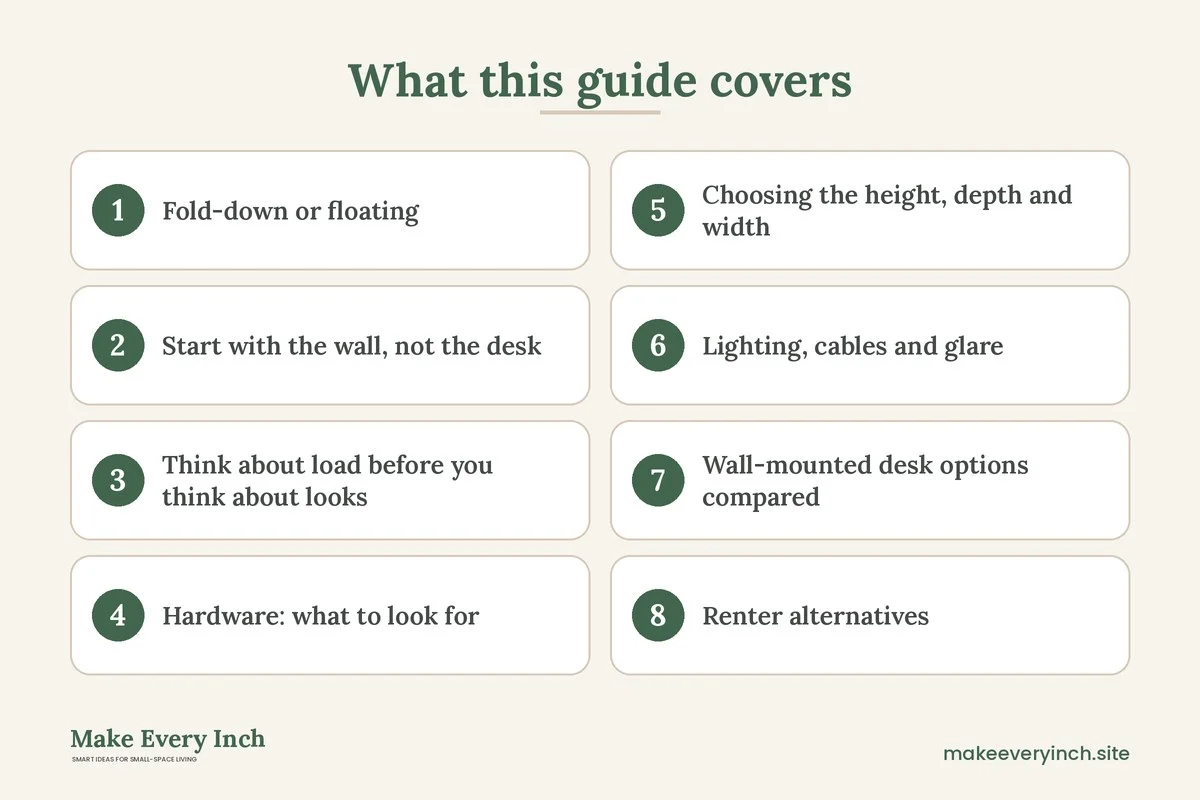
Small home office ideas with wall-mounted desks make sense when floor space is the thing you cannot spare. A wall-mounted desk takes no legs, no footprint and no storage under the surface, which means the floor stays open for a chair, a rug, a bed or a walkway. In a studio, a bedroom corner or a hallway alcove, that can decide whether a workspace fits at all. This guide covers the two main types, fold-down and floating, then goes through how to find studs, how to think about load, which hardware to consider, what height and depth to choose, how to handle lighting and cables, what renters can do instead, and when to call a professional. It also includes a comparison table, three example rooms, a checklist and an FAQ. For the wider topic, read our pillar guide on small home office ideas and the companion post on small home office mistakes to avoid.
A safety note up front. A wall-mounted desk carries a laptop, your forearms, a lamp and sometimes a lot more, and it hangs from the wall. A failure can hurt someone and damage the wall. This post is general information, not engineering or building advice. Follow the instructions that come with the desk and the hardware, check your wall construction, never drill in a rental without permission, and hire a qualified professional if you have any doubt.
Fold-down or floating: choose the type first
The two styles solve different problems. Pick the one that matches how you work before you look at products or measure the wall.
Fold-down desks
A fold-down desk, sometimes called a drop-leaf or a Murphy-style desk, hinges to the wall. When open, a leaf sits flat and is held by a support, such as a folding bracket, a hinged leg or a lid stay. When closed, it forms a slim panel against the wall, and some versions hide shelves or a cabinet behind it.
It suits you if you work in short sessions, if the room doubles as a bedroom or living area, or if you want the office to vanish at the end of the day. The drawback is that a desk that closes must be cleared each time, so it works best with a laptop and a few items rather than a large monitor and papers. It also needs enough clearance in front for the leaf to swing, which is usually the depth of the desk plus the space for the chair.
Floating desks
A floating desk is a shelf-like surface fixed to the wall on brackets or concealed supports, with nothing underneath. It stays in place all day. You can fit a stool or a chair under it, and the floor beneath is open, so a robot vacuum, a basket or a bench can sit below.
It suits you if you work most days, if you want a permanent monitor and lamp, or if you like a clean look. The drawback is that it uses wall space all day, and it must carry the load of a monitor and your arms leaning on the edge, so the mounting needs more care.
Which one is right?
If you use your desk for an hour or two and your home is also your bedroom, a fold-down desk will probably make the room feel bigger. If you work many hours a day, a floating desk with a proper chair will probably be more comfortable. Some people combine both: a floating desk at one end of a wall and a fold-down leaf at the other for overflow tasks.
Start with the wall, not the desk
Almost every wall-mounted desk problem comes from the wall. Check these things before you buy.
What is the wall made of?
Common wall types include drywall over wood studs, plaster over lath, masonry or concrete, and brick. Each needs different hardware. Drywall alone cannot hold a heavy desk, because the board is weak under a pulling or levering load. Plaster may crumble when drilled. Masonry needs masonry anchors and a hammer drill. If you are unsure which type you have, look in an inconspicuous spot, such as the back of a closet or an outlet cover edge, or ask your building manager.
Finding studs
In a wood-framed wall, studs are the vertical framing members behind the drywall, and they are commonly spaced about 16 inches apart from center to center, though 24 inches and irregular spacing both occur. Ways to locate them include a stud finder, tapping the wall and listening for a solid sound, looking for nails or screws along the baseboard, and noting that outlets and switches are often attached to the side of a stud. After you find one stud, measure along the wall to confirm the spacing and mark each edge, then the center. Confirm with a small test hole in a spot that will be covered, if you own the home or have permission.
Be careful about what else is inside the wall. Wires, pipes and ducts run through studs and along walls, and they often sit near outlets, switches and above or below them. Avoid drilling directly above or below an outlet. A scanner that detects metal and live wires can help, though it is not perfect. If you are not sure what is behind the wall, stop and ask a professional.
What if there is no stud where you need it?
Do not hang a heavy desk from hollow-wall anchors alone. Options include moving the desk to line up with studs, adding a mounting board that spans two or more studs, with the desk fixed to the board, or choosing a lighter desk. A mounting board, sometimes called a French cleat or a ledger, spreads the load across studs and gives you freedom over where the desk sits. Choose a board that is thick enough to hold screws, and check the screw length so it reaches into the stud without piercing wires or pipes.
Think about load before you think about looks
Load is the weight the desk must carry, and it is more than the objects on top.
- Static load: the desk itself, the laptop, the monitor, the lamp, books and supplies.
- Dynamic load: leaning on the edge, setting down a heavy item, or pushing on the desk while standing up. These forces can be much higher than the static weight.
- Leverage: the farther the desk extends from the wall, the harder it pulls on the top fasteners. A deep desk is not just heavier, it also multiplies the force at the wall.
A good rule is to start with the maximum weight the manufacturer states for the desk and the hardware, and then stay well below it, so there is a safety margin. If you plan to use two monitors, a printer or a heavy computer, add up the weights, include the desk, and compare the total with the rating. Do not rely on the weight rating of a bracket alone, because the real limit depends on the wall, the fasteners and the way the desk is built.
Test the desk gradually after installation. Press down on the edge with your hand, then increase the weight a little at a time, watching for movement at the wall, gaps and noises. Never test by sitting or hanging on the desk. If anything shifts, take the load off and recheck the fasteners or call a professional.
Hardware: what to look for
You do not need a brand name. You need to match the hardware to the wall and the load.
- Screws and lag screws: For wood studs, structural screws or lag screws of the length and diameter in the instructions go through the mounting plate and into the stud with enough depth to bite. The right size depends on the load, so follow the directions.
- Wall anchors: Hollow-wall anchors, toggle bolts and similar fixings have rated capacities in drywall alone. They may be suitable for light shelves, but they are not a replacement for studs under a working desk unless the manufacturer says they are suitable for your load.
- Masonry anchors: For brick or concrete, use the anchor type and drill bit size that match the product, and wear eye protection and a dust mask.
- Brackets: Look for sturdy steel brackets with a gusset or diagonal brace. A fold-down desk usually relies on a hinge plus a support arm, so check that both parts are rated for the load.
- Mounting rails: A continuous rail screwed into several studs spreads the load and lets you slide the desk along it.
- Washers and fasteners: Use the washers and bolts supplied or specified. Mixing parts is a common source of failures.
Check the fasteners every few months. Wood moves with the seasons, and screws can loosen over time. Tighten what has loosened, and replace anything with rust or stripped threads.
Choosing the height, depth and width
A wall-mounted desk is at the height you pick, so there is no adjusting the legs later. Getting this right matters.
- Height: Many people find a surface height of about 28 to 30 inches comfortable when seated, but body size and chair height change that. A simple way to decide is to sit in the chair you will use, with your feet supported, relax your shoulders and bend your elbows to about a right angle. Measure from the floor to the underside of your forearms, then add a small allowance for the keyboard. That gives you a starting figure. Tape a strip to the wall at that height and sit at it for a minute before drilling anything.
- Depth: For a laptop, 16 to 20 inches is often enough. For a monitor, 20 to 24 inches lets the screen sit at a comfortable distance. A deeper desk needs stronger support, so do not choose more than you need.
- Width: 30 to 36 inches suits a laptop and a notebook, 40 to 48 inches suits a monitor and a lamp, and 60 inches or more is a real workstation. Check that the width fits between corners, doors and windows with space on both sides.
- Clearance below: Leave at least 24 inches of knee clearance under the desk and enough depth to tuck a chair. Take care with the front edge of a floating desk, since a sharp corner at hip height can be a hazard for children and guests. Rounded corners help.
- Standing option: If you want to stand part of the time, a second desk or a shelf set at elbow height when standing, around 38 to 44 inches for many adults, offers a variety of positions. This is a general guide, not medical advice.
Lighting, cables and glare
A wall-mounted desk is often the only piece of furniture in an area, so the surroundings do a lot of work.
- Light: Place a task light on the wall or the desk. A clamp lamp on a shelf above the desk keeps the surface clear. Check that no window glare falls on the screen. Our guide to renter-friendly lighting ideas lists plug-in and adhesive options.
- Cables: A floating desk has nothing to hide cords, so plan the route. Run cables down the wall inside a cord cover, or along the underside of the desk with adhesive clips. Keep a power strip within reach, ventilated and not overloaded. For ideas that do not mark walls, see renter-friendly ways to hide cords.
- Outlets: Plan the desk near an outlet, as extension cords across a room are a tripping hazard. Never run a cord under a rug. If you need a new outlet, that is work for a licensed electrician.
- Sound and heat: A desk by a radiator or heater vent traps hot air, so keep it clear, and keep ventilation open when you work.
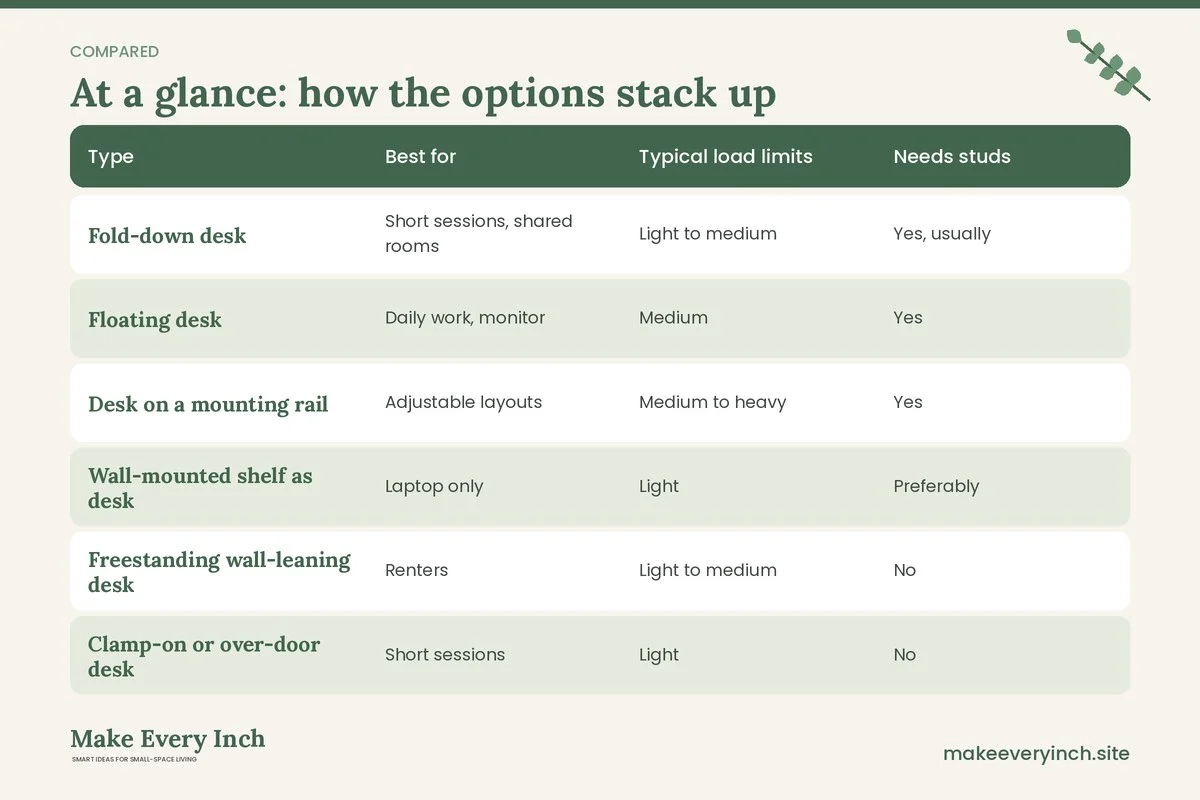
Wall-mounted desk options compared
| Type | Best for | Typical load limits | Needs studs | Rental friendly | |
|---|---|---|---|---|---|
| Fold-down desk | Short sessions, shared rooms | Light to medium | Yes, usually | Only with permission | |
| Floating desk | Daily work, monitor | Medium | Yes | Only with permission | |
| Desk on a mounting rail | Adjustable layouts | Medium to heavy | Yes | Only with permission | |
| Wall-mounted shelf as desk | Laptop only | Light | Preferably | Only with permission | |
| Freestanding wall-leaning desk | Renters | Light to medium | No | Yes | |
| Clamp-on or over-door desk | Short sessions | Light | No | Often |
Use the table as a starting point. The real limits come from the product instructions and the wall.
Renter alternatives
Many leases ban drilling, and a wall-mounted desk is a large hole in the plan. Before you give up on the idea, read your lease and ask the landlord in writing, because some will allow fixings if you patch holes at move-out. Never drill without permission. If the answer is no, these options give a similar result.
- Leaning ladder desk: A freestanding desk that leans against the wall has a slim footprint, shelves above, and no drilling. Check that it is stable, and anchor it only if the lease allows.
- Wall-leaning shelf desk: A flat board on two tall frames, such as a pair of ladder shelves, makes a floating-style surface. Secure it to prevent tipping, following the manufacturer’s advice.
- Over-door or clamp-on desk: Some designs hook over a door or clamp to a surface. They suit light use, and the weight limits are low.
- Console table desk: A narrow console, 12 to 16 inches deep, can serve as a laptop desk in a hallway and as a console the rest of the time.
- Drop-leaf table: A small table with fold-down leaves occupies about 8 to 12 inches of wall when closed and opens into a workspace.
- Tension-pole shelving: A floor-to-ceiling tension unit may hold shelves, and some include a small desk, though the weight limits are modest, and they depend on the ceiling.
- Murphy-bed combination: If you have a wall bed, a desk built into it can double the use of the wall. See our post on studio apartment ideas with a Murphy bed. That is a larger project that needs permission and installation.
For more ideas on keeping a rental flexible, see our guide to organization ideas for renters.
Step-by-step installation overview
This overview is meant to help you understand the work, not replace the manufacturer’s instructions or a professional.
1. Get permission. If you rent, ask in writing. If you own, check the plans for wiring and plumbing.
2. Choose the wall and the height. Tape the outline of the desk and sit at it before you commit.
3. Find and mark the studs. Use a stud finder and confirm with a second method. Mark the edges and centers.
4. Check for wires and pipes. Avoid areas around outlets and above or below them, and use a detector. Stop if you are unsure.
5. Mark and level the mounting plate or rail. Use a level, mark the screw positions on studs, and drill pilot holes at the size the screws need.
6. Fasten the rail or brackets. Use the supplied hardware, and tighten evenly.
7. Attach the desk. Two people make this safer, since the desk may be heavy and awkward.
8. Check and test. Add weight a little at a time. Look for movement, gaps and noises.
9. Finish the details. Route the cables, add the lamp, and cover sharp edges.
If any step feels uncertain, stop and hire a professional. A handyperson or carpenter can install a desk in a short visit, and an electrician can add an outlet.
When to hire a professional
Choose a professional if any of these apply.
- You cannot locate studs, or the wall is plaster, brick or concrete and you do not own the right tools.
- The studs do not line up with the position you want.
- There may be wires or pipes behind the wall.
- The desk is heavy, deep or will carry a large monitor setup.
- You need a new outlet or a wiring change.
- You are not sure the wall can carry the load, for example in an older building.
- The wall is a shared or party wall, or a load-bearing one, and the lease requires approved contractors.
- You are not comfortable using the tools.
A professional can check the wall, choose hardware, and install the desk safely. Ask for a written estimate, and confirm in advance that the landlord or building allows the work. Keep the installation instructions with the lease or deed papers.
Three example rooms
Example 1: A studio with a fold-down desk
A studio has a 6 foot wall beside the bed. The owner installs a fold-down desk, 36 inches wide and 18 inches deep, fixed into two studs with permission from the building. The desk sits at about 29 inches. When closed, it forms a shallow panel beside a framed print. A stool tucks into a corner, a clamp lamp hangs from a rail above, and a switched power strip is mounted under a nearby shelf where it can breathe. The floor stays open for the bed and a 32 inch walkway.
Example 2: A hallway with a floating desk
A narrow hallway is 40 inches wide. A floating desk 14 inches deep and 42 inches long runs along one side. With a 14 inch depth and a 3 inch rounded edge, it leaves 26 inches for passing, which is enough for the occasional pass but tight for a chair, so the owner uses a slim stool that slides under the desk. A mounting rail fixed into three studs spreads the load. A cord cover routes the cables to an outlet, and a ledge lamp lights the surface. The pillar guide on small home office ideas shows more hallway layouts.
Example 3: A rental with no drilling
A renter’s lease bans drilling. They choose a leaning ladder desk, 30 inches wide, with two shelves above. The desk is stable against the wall, but they place a non-slip pad under each foot and keep heavy items on the lower shelf. A tension rod in the window alcove holds a lightweight curtain to cut glare, and adhesive clips hold the cable along the baseboard. When they move out, the desk goes with them. Our guide to how to fit a desk into a studio apartment offers more renter-friendly layouts, and small bedroom ideas with a desk covers bedroom corners.
Mistakes to avoid
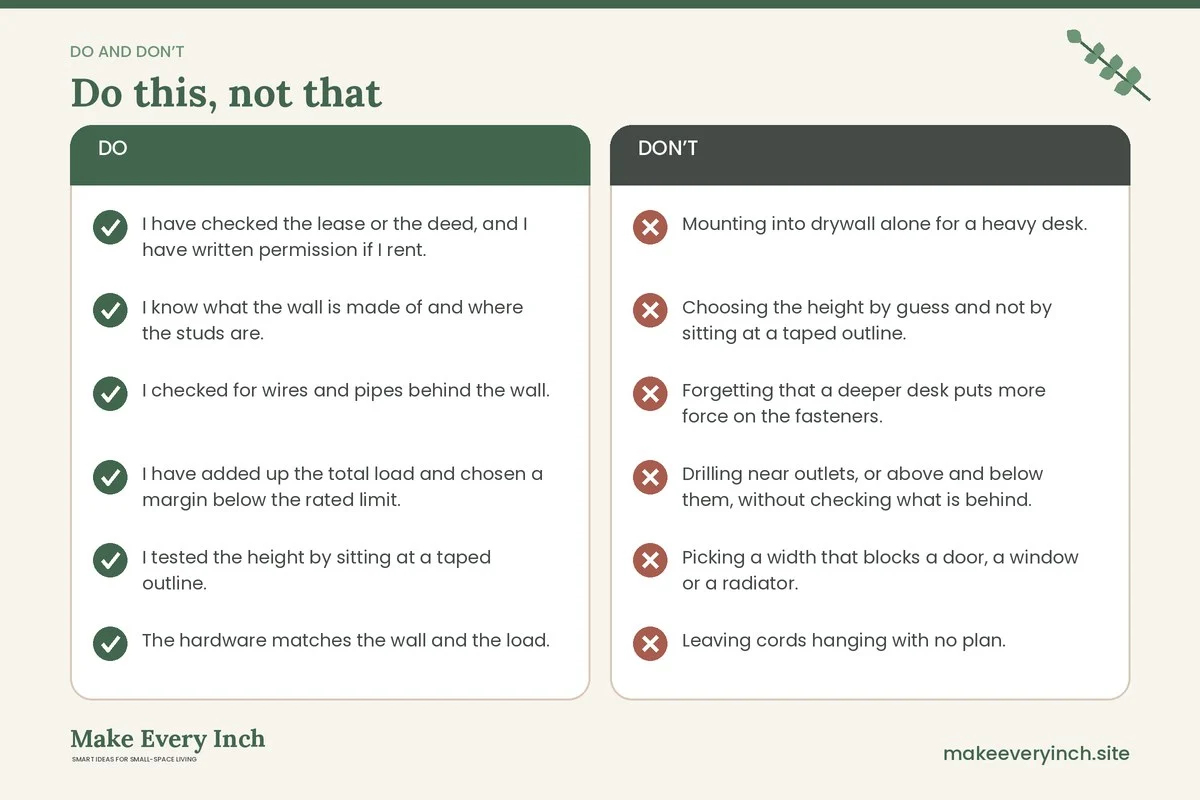
- Mounting into drywall alone for a heavy desk.
- Choosing the height by guess and not by sitting at a taped outline.
- Forgetting that a deeper desk puts more force on the fasteners.
- Drilling near outlets, or above and below them, without checking what is behind.
- Picking a width that blocks a door, a window or a radiator.
- Leaving cords hanging with no plan.
- Ignoring a lease clause on drilling.
- Skipping the weight test and the follow-up checks.
Checklist
- I have checked the lease or the deed, and I have written permission if I rent.
- I know what the wall is made of and where the studs are.
- I checked for wires and pipes behind the wall.
- I have added up the total load and chosen a margin below the rated limit.
- I tested the height by sitting at a taped outline.
- The hardware matches the wall and the load.
- There are 24 inches of knee clearance and a clear walkway.
- A task lamp, a ventilated power strip and a cord route are planned.
- I have a second person to help with the installation.
- I will check the fasteners every few months.
- I will call a professional if anything is uncertain.
FAQ
Can a wall-mounted desk hold a monitor?
Often yes, if it is mounted into studs and the total load is below the stated rating with a good margin. Heavier setups and deep desks need stronger support, so ask a professional if you are unsure.
How high should I mount the desk?
Many people use about 28 to 30 inches as a starting point, but your height and chair matter. Sit in your chair, relax your shoulders and bend your elbows to about a right angle, then measure. Tape the outline to the wall first.
Do I need studs for a fold-down desk?
In most cases, yes. A fold-down desk puts a pulling load on the hinges when open. Follow the manufacturer’s instructions, and use a mounting board if the studs do not match the desk.
Can I install a wall-mounted desk in a rental?
Only with permission from the landlord. Many leases ban drilling, so ask in writing. If the answer is no, use a leaning or freestanding desk, a drop-leaf table or a clamp-on option.
What if my wall is plaster or brick?
These walls need different drills, anchors and care. Plaster can crack, and masonry needs masonry anchors and the right tools. A professional can assess the wall and fit the hardware safely.
How do I hide the cables on a floating desk?
Run them down the wall in a paintable cord cover, or along the underside of the desk with clips, and finish at an outlet. Keep the power strip ventilated. Our guide on renter-friendly ways to hide cords has methods that do not mark walls.
Is a wall-mounted desk good for ergonomics?
It can be, if the height, depth and chair are right and you take breaks. Because the height is fixed, test it before mounting. This is general information and not medical advice.
Keep going: Keep planning with our small home office ideas, small home office mistakes to avoid and diy desk ideas for small spaces.
Save this guide for later
Pin the ideas you like to Pinterest so you can come back to them when you plan your space.