Small Home Office Ideas for Shared Spaces
Quick answer: The best small home office ideas for shared spaces rely on agreements as much as furniture. Define a work zone with a rug, a screen or a shelf, agree on work hours and quiet signals with everyone in the home, give your work gear one closed home so it is out of sight after hours, and protect private papers and screens. A clear 10-minute household meeting often beats a new desk.
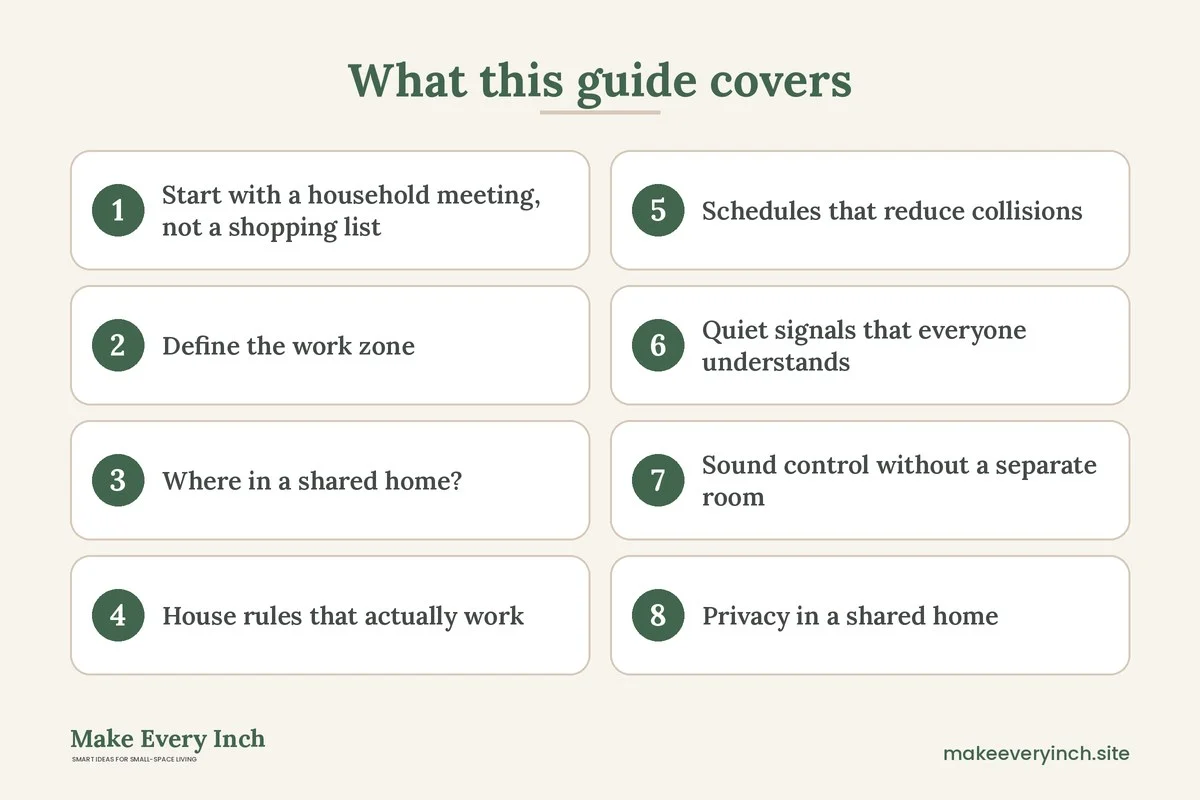
Small home office ideas for shared spaces begin with a truth that desk guides skip: the hardest part of working at home with other people is not the furniture, it is the people. A child asks for a snack mid-meeting, a roommate runs the blender, a partner needs the same table for dinner and a laptop ends up on the sofa because there is nowhere else to put it. A good shared-space office solves both problems at once. It marks out a physical spot, and it sets up simple rules that everyone understands. This guide covers the household conversation, how to mark a work zone, schedules and quiet signals, privacy, storage for work gear, three example homes, a comparison table, a checklist and an FAQ. It sits inside our pillar guide to small home office ideas. If your main concern is how you look and sound on camera, the companion post on small home office ideas for video calls goes into backgrounds, lighting and echo.
Start with a household meeting, not a shopping list
Before you move a table, sit down with the people you live with for ten minutes. Bring a notepad. The aim is to learn what each person needs, not to announce a plan. Ask these questions:
- Who works or studies at home, and on which days?
- Which hours are the most important, such as calls, deadlines or exams?
- Which rooms are free at those times?
- What noise is unavoidable, such as a child’s nap or a late shift?
- What do people need from the shared space in the evening?
- Is anything private, such as documents, a screen or a confidential call?
Write the answers on one sheet. You will find that the overlaps are fewer than you feared. Many households discover that only two or three hours a week truly collide. Those are the hours to solve with schedules and signals, rather than by building a wall.
Roommates and families need different agreements
Roommates have separate lives and equal claims to common areas. Aim for a written, fair arrangement that includes who may use the living room table, how many hours, what happens when guests come and what noise is acceptable. Families have children and different ages, so the plan includes what a child may ask for during work time, what is off limits and when the adult becomes available again. Both groups benefit from agreeing on a review date, such as two weeks after the start, to adjust what is not working.
Define the work zone
A work zone is the smallest unit of territory that tells everyone, including you, that you are working. It does not have to be a room. It can be a rug, a shelf line, a screen or a corner.
Ways to mark a zone
- A rug. A small rug under a table and chair marks the zone. People learn that the rug is the office.
- A folding screen. A screen provides visual separation and a bit of privacy. See renter-friendly ways to divide a studio apartment and DIY room divider ideas for studio apartments.
- A bookshelf as a divider. A low, open bookshelf placed at right angles to the wall creates an alcove. Anchor it to the wall if it is tall, and ask permission before you drill. Put heavy items on lower shelves.
- A curtain on a ceiling-height rod. The curtain closes the zone when you work and opens when you do not. Use a rod that is rated for the weight.
- A different seat. Using one particular chair for work and not for leisure helps both you and your household feel the shift.
- A lamp. A task lamp that is on only during work hours acts as a clear sign.
Dimensions that work in a tight home
- Work surface depth: 20 to 24 inches suits a laptop and a notebook. A monitor and keyboard usually need 24 to 30 inches.
- Work surface width: 30 to 40 inches is a practical minimum for a laptop, a notebook and a lamp.
- Chair clearance: about 30 inches behind the chair so that you can stand without bumping into other furniture, though 24 inches works for a short stretch.
- Walkway beside the zone: 30 to 36 inches if people walk past regularly, or 24 inches for an occasional path.
- Distance from the household’s busy area: the more you can keep between you and the kitchen or the television, the better.
Use painter’s tape on the floor to mark the zone. Live with it for a few days before you buy anything.
Where in a shared home?
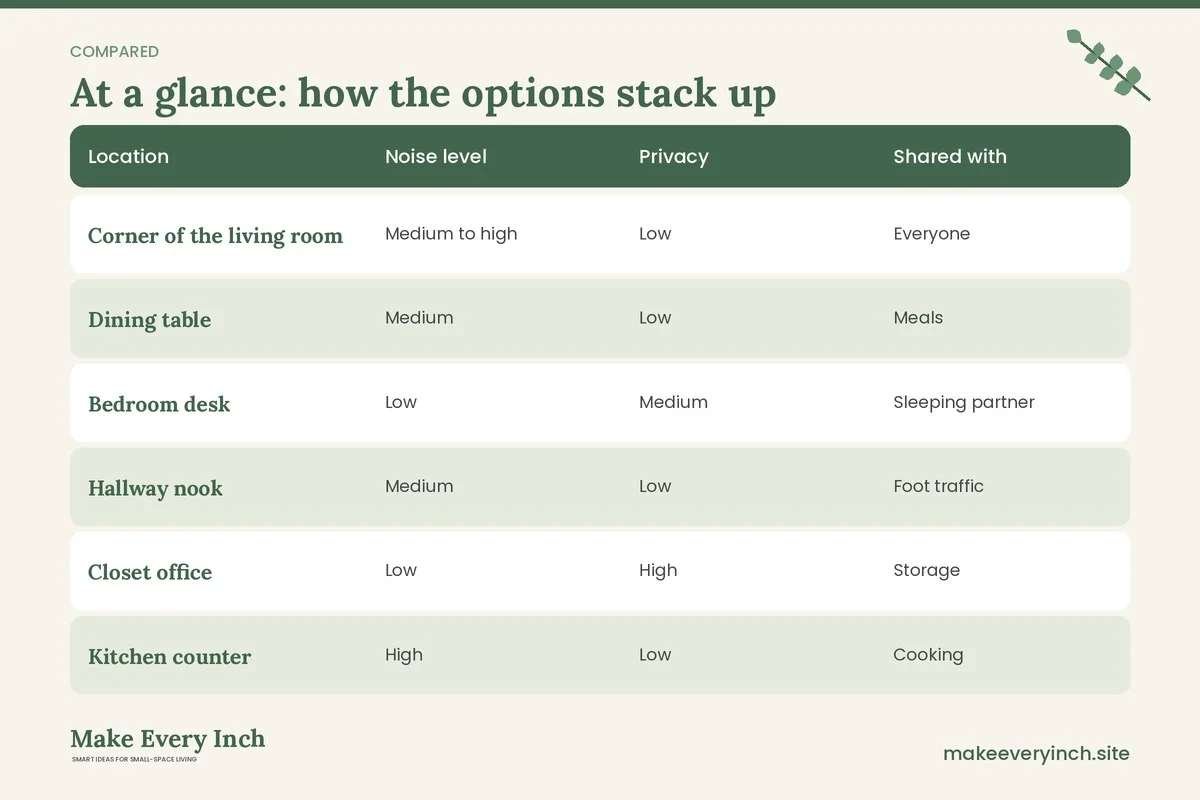
Pick the location by thinking about noise, traffic and privacy, not just space. The table compares typical places.
| Location | Noise level | Privacy | Shared with | Good for | Watch out for |
|---|---|---|---|---|---|
| Corner of the living room | Medium to high | Low | Everyone | Light work, laptops | Evening conflicts with TV |
| Dining table | Medium | Low | Meals | Short sessions, flexible work | Clearing away every day |
| Bedroom desk | Low | Medium | Sleeping partner | Calls, focused work | Blurring rest and work |
| Hallway nook | Medium | Low | Foot traffic | Short tasks | Movement behind you |
| Closet office | Low | High | Storage | Calls, privacy | Ventilation and warmth |
| Kitchen counter | High | Low | Cooking | Quick tasks | Spills and steam near devices |
| Window alcove | Medium | Medium | Seating | Reading, writing | Glare and temperature |
If you need privacy, the closet or the bedroom has the advantage. If you need access to the household, the living room or the dining table is better. For more bedroom layouts, see small bedroom ideas with a desk and small bedroom desk ideas. For studios, our guide to studio apartment ideas for working from home has more plans.
House rules that actually work
Rules in a shared home need to be short, fair and easy to remember. Aim for five or fewer, and write them where everyone can see them.
Sample household rules for work time
- Work hours are marked. Post them on the fridge or share a calendar.
- A closed door or a lit lamp means do not interrupt. Exceptions are emergencies.
- Use headphones for anything loud. That includes music, games and videos.
- Shared areas return to normal at the end of the day. The table is cleared before dinner.
- Common items stay in common areas. Do not move another person’s work items.
- Guests are warned in advance. Guests learn the quiet signal when they arrive.
For families with children
Children cope better with a visual plan than with a verbal rule. A simple traffic-light card on the desk, with green for come in, yellow for ask quietly and red for do not interrupt, works for many ages. Offer a short list of things the child can do while you are busy, such as a puzzle, a book or a drawing task. Tell them when you will be free, using something they understand, like a sand timer or a clock with a colored sticker. Keep an interruption-friendly time, such as a ten-minute check-in each hour if your work allows it. This is general advice and every family and child is different, so adapt it to what works at home.
For roommates
Roommates can agree on a booking calendar for shared areas, with a few blocks of protected quiet. Rotate the best hours if more than one person works at home. Discuss visitors and deliveries, and agree how to handle phone calls in common areas. If one person has a recurring early call, others can adjust their routines for those hours. A short written agreement avoids small resentments growing into larger ones.
Schedules that reduce collisions
A schedule does not need to be strict. It needs to be visible.
Build a weekly grid
Draw seven columns for the days and a few rows for the time blocks, such as morning, midday, afternoon and evening. Each person marks the hours when they must be at a desk, when they need quiet and when they are free. Look for clashes, then solve them one at a time:
- Move flexible tasks, such as email and admin, to the noisy hours.
- Reserve silent hours for calls and deep work.
- Place noisy household tasks, such as vacuuming, outside the call hours.
- Swap seats. One person uses the dining table in the morning, the other in the afternoon.
- Use another room, a library or a cafe for the occasional collision.
Plan the transitions
Transitions are when conflicts occur: the five minutes before a meeting, when you need to set up, and the minutes after, when you must pack away. Add a buffer. Ten minutes either side of a call gives you time to set up the zone and take it down. A shared table needs a small routine, such as a tray that holds your laptop and notebook, so that you can clear the table in 30 seconds.
Quiet signals that everyone understands
A signal replaces a conversation. It tells people what you need without interrupting the work.
- A door sign. A reversible card with “Call in progress” on one side and “Free” on the other.
- A lamp or a light. A small light on the desk switches on when you must not be interrupted.
- A headset on. Agree that a headset on the head means do not speak to me unless it is urgent.
- A colored card. Green, yellow and red for children or guests.
- A calendar on the fridge. The household sees the call times in advance.
- A scarf on a chair. In an open plan, a chair with a scarf over it means the zone is in use.
- A message in the group chat. For roommates, a quick message such as “On a call until 3” avoids interruptions.
Choose one or two, and teach everyone how they work. Fire safety matters too: do not block exits or lock doors in a way that prevents people from entering in an emergency. Keep the signal as a request, not a barrier.
Sound control without a separate room
Shared homes are noisy, and walls are thin. A few tricks help a lot.
- Layer soft items. A rug, curtains and upholstered furniture soften echo and absorb sound.
- Place the desk away from shared walls. Put it against an outside wall or one backed by a closet instead of by a neighbor’s television.
- Use a fabric panel behind you. A thick quilt on a tension rod works as a quick acoustic panel.
- Seal gaps. A door draught excluder at the bottom of a door reduces sound leaks. Ask your landlord before adding permanent seals.
- Use headphones with a microphone. They reduce the sound you hear and the sound you send.
- Add soft background sound. A little ambient noise in the hall can mask conversation, which is useful for privacy.
If you are working on camera, our guide on small home office ideas for video calls covers more detail about echo and backdrops.
Privacy in a shared home
Privacy is about information, not just doors. In a shared home, others can see your screen, hear your calls and find your papers.
Screens
- Angle the monitor away from the walkway, or place the desk so that your back is to a wall.
- Use a privacy filter on the screen for sensitive work, if your workplace allows.
- Lock the screen whenever you leave, even for a minute. Use a password on the laptop.
- Keep notifications hidden when others are present.
Papers and devices
- Keep documents in a closed folder, a lidded box or a drawer with a lock, if you work with confidential materials.
- Shred or properly dispose of papers that contain private details.
- Put the laptop and devices in a bag or cupboard at the end of the day, which also protects them from spills and children.
- Do not leave passwords on notes in view.
Calls
- Use headphones, so that others do not hear the other side of the call.
- Move to a bedroom, closet or hallway for sensitive discussions.
- Tell the household that a call is confidential and ask for quiet.
Follow your employer’s rules on data and confidentiality. This is general guidance and does not replace those rules.
Storage for work gear
Work gear is the part of the office that makes a shared space feel invaded. Laptop, charger, headset, notebook, folders, printer and pens spread quickly. The goal is a home for each item that is close to the zone and out of sight when you are done.
The work box
A lidded box or a basket holds the daily kit: laptop, charger, headset, notebook, pens and a power strip with a long cable. At the end of the day, put everything in the box and move it to a shelf or a closet. This turns the dining table or the living room back into home in under a minute. Choose a box with a handle so that it moves easily.
Vertical options
- A rolling cart. A narrow cart with three tiers holds paper, a printer and supplies. It rolls into a closet or beside a sofa.
- A tall narrow shelf. Anchor a tall shelf to the wall, with heavy items low. Check the weight rating before loading it.
- Over-the-door organizers. Hang pockets over the back of a door to hold supplies without drilling.
- A bench with storage. A bench with a lid doubles as seating and storage for gear.
- Under-bed boxes. Flat boxes hold paper files in a bedroom.
For more ideas, see small space organization ideas, hidden storage ideas and no-drill storage ideas for renters. If you want to build a fold-away desk, DIY desk ideas for small spaces has plans, and how to fit a desk into a studio apartment covers layouts.
Label and limit
A label on each box ends arguments about whose item is whose. Set a limit, such as one box and one shelf per person, and stick to it. If gear overflows, it is a sign that you need to edit, not buy more storage.
Power, cords and safety in shared spaces
When several people use one area, cables become a hazard. Children and pets can pull on cords, and a single power strip can quickly become overloaded.
- Check the load. Add up the devices connected to a power strip, and make sure the total does not exceed its rating. Do not plug one strip into another.
- Keep cords out of walkways. Run them along the wall or under furniture, not under a rug.
- Keep liquids away. A cup of coffee beside a laptop and a power strip is a risk.
- Protect children and pets. Use cord covers or tuck cables into a box. Keep small items, such as chargers and batteries, out of reach of toddlers and animals.
- Turn off and unplug. At the end of the day, switch off the strip, if recommended.
- Ventilation. Do not cover laptops and chargers with blankets or papers, and do not stack items on vents.
- Anchor tall furniture. Anchor any tall shelf or cabinet that children could climb, using the hardware the manufacturer recommends. Ask the landlord before you drill into a wall.
For tidy routes, read our guide to renter-friendly ways to hide cords.
Ergonomics in a borrowed spot
A shared table is rarely the right height for long hours. General guidance, which is not medical advice, usually suggests keeping the screen near eye level, forearms supported and feet flat on the floor or a footrest. If you work at a dining table, use a cushion on the chair, a stack of books or a riser for the laptop and a separate keyboard. Take short breaks and change position often. If you have pain or a health condition, ask a qualified professional about your setup. For a better long-term desk, read our guide to the best desks for small apartments.
Three example homes
Example 1: a family of four in a two-bedroom apartment
Two adults work from home on different days, and two children do homework in the afternoon. The dining table sits in the living room. The plan: one adult takes the corner desk in the bedroom for calls, and the other uses the dining table with a work box. Children use the table for homework after 3 pm, when the work box is put away. A traffic-light card sits on the desk. A rolling cart on the side of the sofa holds school and work supplies, and a bookshelf anchored to the wall holds the printer. The household meets for ten minutes on Sunday to look at the week’s calendar.
Example 2: three roommates in a shared apartment
Two roommates work from home on alternating days, and the third works at an office. The living room holds a table and a sofa. The plan: a shared calendar assigns the table to one roommate on Mondays and Wednesdays and to the other on Tuesdays and Thursdays. Calls happen in bedrooms, and the table is for solo work. A folding screen marks the zone, and a basket under the table holds each person’s gear. A short written agreement covers guests, cooking at call times and a quiet hour. A fabric panel on the wall behind the table reduces echo.
Example 3: a couple in a one-bedroom apartment
Both partners work from home, with different call schedules. The bedroom holds a small desk, and the living room a fold-down table. The plan: the partner with more calls takes the bedroom desk, with a curtain on a ceiling-height rod to hide the bed, and the other uses the living room table with a laptop riser. A lamp on the desk signals do not disturb. At the end of the day, both put laptops in a closed box on a shelf, and the table is a dining table again. A weekly check-in lets them swap spots if a schedule changes.
Using the space outside work hours
A shared home must also work at 7 pm. If you cannot switch the zone off, the home never rests. A few ideas help:
- Close the laptop and put it in the work box.
- Pull a curtain across the desk or fold the screen.
- Switch the task lamp off and a warm lamp on.
- Turn the chair to face the room.
- Remove papers from view.
These rituals matter for your mind as well as the household, since they mark the end of the day. Some people also walk around the block to create a commute.
Mistakes to avoid
- Setting up first and talking later. A beautiful desk fails if the household was not part of the plan.
- Using rules that nobody wrote down. Spoken rules fade within a week.
- Working on the sofa. It blurs rest and work and can strain your back.
- Spreading gear across shared tables. It makes others feel the home has been taken over.
- Ignoring the evenings. Your colleagues’ hours end, but your family’s start.
- Overloading a power strip. Several chargers and a heater on one strip is a risk.
- Locking a door in a way that blocks emergency access. Use signals, not barriers.
- Never reviewing. What worked in week one may fail in week four.
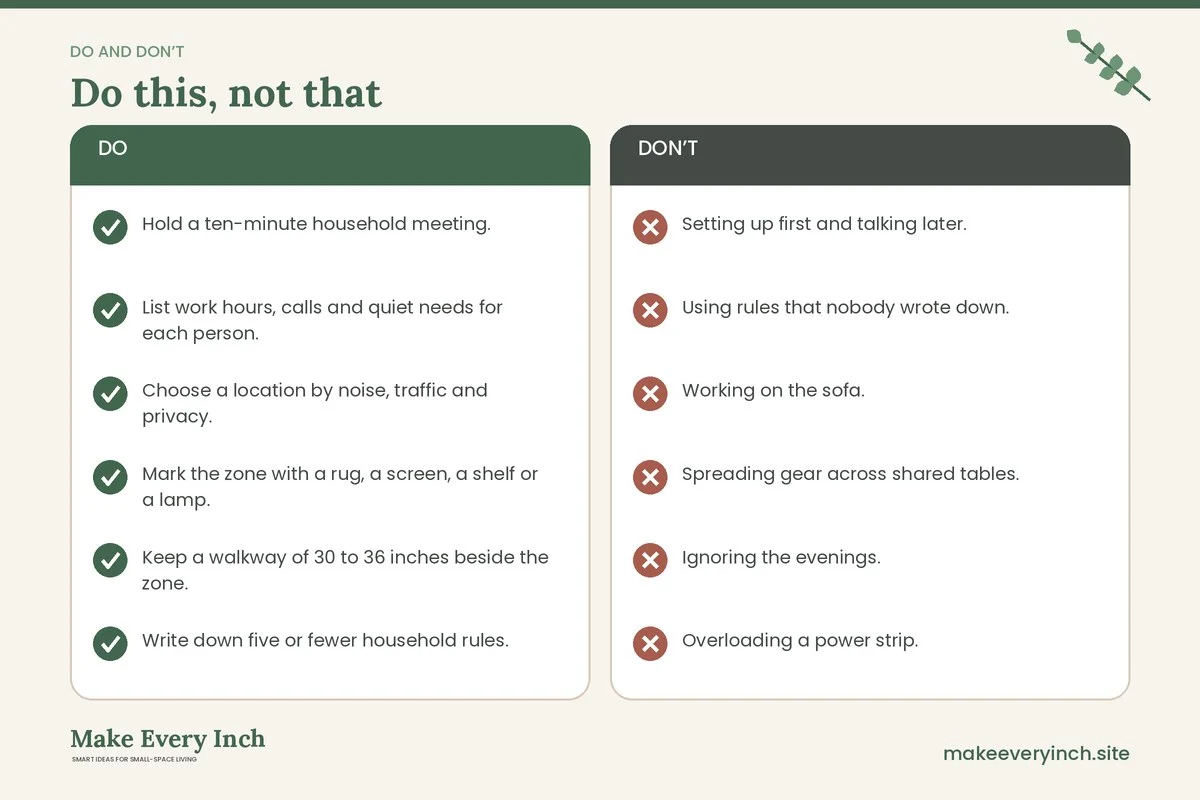
Shared space office checklist
- Hold a ten-minute household meeting.
- List work hours, calls and quiet needs for each person.
- Choose a location by noise, traffic and privacy.
- Mark the zone with a rug, a screen, a shelf or a lamp.
- Keep a walkway of 30 to 36 inches beside the zone.
- Write down five or fewer household rules.
- Create a weekly schedule grid.
- Pick one or two quiet signals and teach everyone.
- Angle the screen away from the walkway and lock it when you leave.
- Pack gear into a work box at the end of the day.
- Check power strip ratings and keep cords off walkways.
- Anchor tall furniture and ask permission before drilling.
- Review the plan after two weeks.
FAQ
How can I work from home in a small shared space?
Mark a clear zone, agree on work hours and signals with the people you live with and store your gear in a box when you finish. The agreements matter as much as the furniture.
What is a good quiet signal for a family?
A traffic-light card, a door sign or a lamp on the desk works well. Children understand colors and objects more easily than rules, so choose a signal that is visible and simple.
How do I keep work papers private from roommates?
Use a lidded box, a drawer or a lockable file case, lock your screen when you leave and angle the monitor away from walkways. Follow your employer’s rules on confidential information.
Where is the best spot for a desk in a shared home?
A bedroom or a closet gives the most privacy, and a corner of the living room gives the most access. Choose by noise, traffic and the time of day you work.
How do I reduce noise without a separate room?
Use rugs, curtains, a fabric panel and a headset with a microphone. Put the desk away from shared walls, and schedule loud household tasks outside call hours.
Can I do this in a rental?
Yes. Use tension rods, freestanding screens, rolling carts, rugs and floor lamps. Check the lease, and never drill without permission.
How do I store work gear if I use the dining table?
Keep a lidded work box or a basket with handles. Put your laptop, charger, headset and notebook in it at the end of the day, and store it on a shelf or in a closet.
What if the schedule keeps breaking down?
Hold a short review every week or two, and adjust. Move flexible tasks to noisy times, swap seats and consider an occasional day at a library or cafe.
Keep going: Keep planning with our small home office ideas pillar guide, small space organization ideas and renter-friendly ways to hide cords.
Save this guide for later
Pin the ideas you like to Pinterest so you can come back to them when you plan your space.