Small Home Office Organization Checklist
Quick answer: A small home office organization checklist works best in layers: a five-minute daily reset, a twenty-minute weekly tidy and a monthly audit of paper, cords, files and furniture. Start with a setup audit, then split tasks into physical and digital lists. Check safety items such as power strips, cords and anchored shelves every month, and keep the printable-style lists where you can see them.
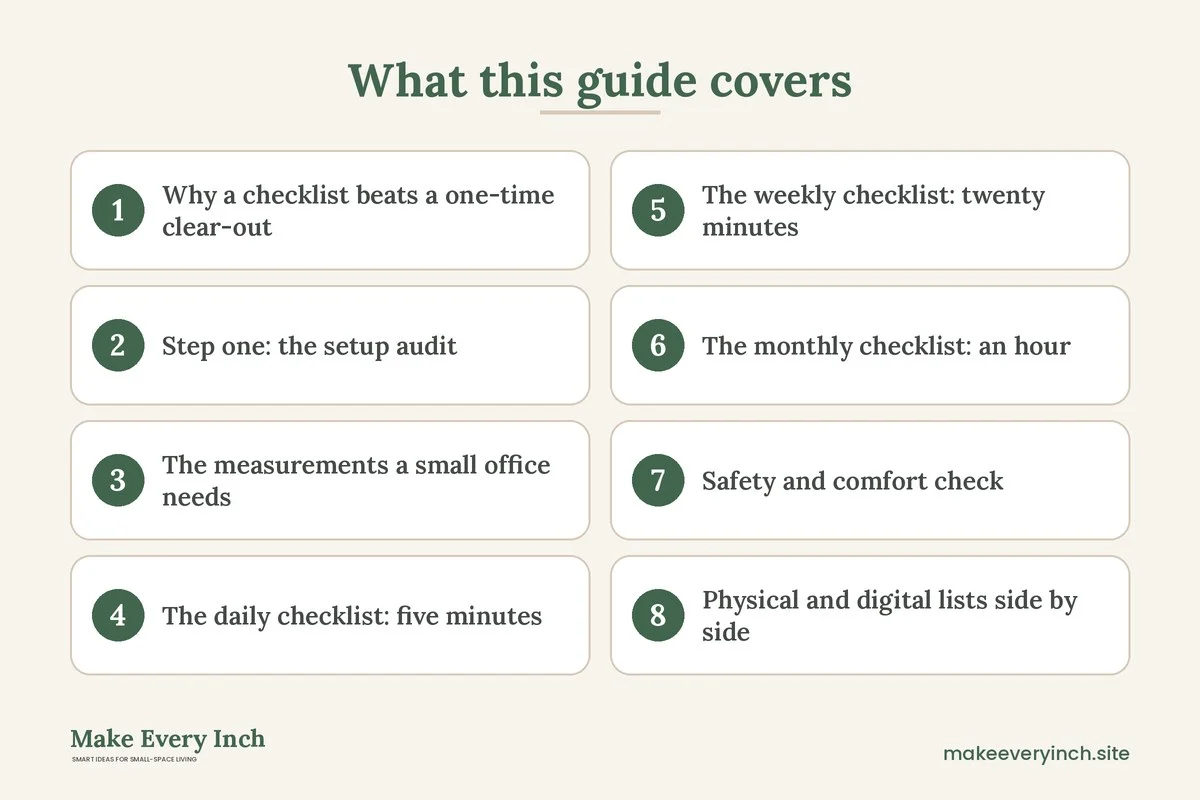
A small home office organization checklist turns a vague wish to be tidier into a routine you can finish. Most small offices do not fall apart because of the furniture. They fall apart because nobody decides what gets done daily, what gets done weekly and what gets reviewed monthly, so small piles grow quietly until the desk is unusable. This guide gives you a full system. It covers a setup audit, the daily, weekly and monthly checklists, separate physical and digital lists, a safety check, a task table, three example offices, ways to adapt for a shared room, and printable-style sheets you can copy by hand. If you are still planning the room itself, start with our main guide to small home office ideas, and for a student angle see the companion post on small home office ideas for students.
Why a checklist beats a one-time clear-out
A weekend purge feels great and fades within a month. The reason is that organization is a maintenance habit, not a project. A checklist gives the habit a shape. It tells you what to do, in what order and how long it should take, so you do not have to decide on the spot. Small spaces need this more than large ones, because a few stray items cover a high share of the surface.
A good checklist has three traits. It is short enough to finish, specific enough that you know when it is done, and tied to a trigger, such as the end of the work day or a Friday afternoon. If a task is vague, such as “tidy desk,” split it into steps such as “clear the surface, wipe it, return pens to the cup.” Tasks with clear edges are easier to start.
Step one: the setup audit
Before the routines, audit the space. Spend 30 to 45 minutes with a notebook and a timer, and work through these questions. Treat the results as notes for yourself, not as a score.
Physical audit
- Surface: how much of the desk top is clear when you start work? Many people feel better with at least half of the surface free.
- Reach zones: which items do you use daily, weekly and rarely? Daily items belong within arm’s reach, weekly items within a step, and rare items elsewhere.
- Seating and screen: is the chair comfortable for your usual session? Is the screen near eye level? This is general guidance, not medical advice, so adjust to what feels comfortable and take breaks.
- Light: is there glare on the screen, a shadow on your writing hand or a dark corner?
- Storage: is every shelf, drawer and box holding the right things, or is it a hiding place?
- Cords and power: how many devices share one strip, and where do cords run?
- Floor: can you move the chair in and out and walk past without bumping?
- Walls and shelves: are tall units anchored where you have permission, and are heavy items low?
Digital audit
- Desktop and downloads: how many files are loose on the screen or in the downloads folder?
- Folders: is there a clear structure, or do items live in many places?
- Email: how many unread or unsorted messages are there?
- Passwords and accounts: are they stored in a safe, organized way?
- Backups: do you have at least one up-to-date copy of important files?
- Notifications: which alerts are essential and which can be turned off?
Write the three biggest problems at the top of a page. These become your first-month focus, and everything else can wait.
The measurements a small office needs
A few numbers help you judge a space quickly. They are typical ranges, so adapt them to your room and body.
- Desk surface: 20 to 30 inches deep and 36 to 60 inches wide for one person.
- Clear zone: keep the central 18 to 24 inches of the desk free for the task in front of you.
- Leg room: about 24 inches of clear width and 20 or more inches of depth under the desk.
- Chair clearance: 30 to 36 inches behind the chair to stand up and move.
- Shelf height: the most-used items between knee and shoulder height, and heavy items below waist level.
- Shelf depth: 10 to 12 inches suits books and binders, while 8 inches or less suits small boxes and supplies.
- Cord slack: a loop of a few inches at each end so plugs are not strained.
The daily checklist: five minutes
The daily list is a short reset at the end of work. Set a timer for five minutes and move through it in order.
- Close open tabs and save your work.
- Write tomorrow’s first three tasks on paper.
- Return pens, notebooks and tools to their homes.
- Move loose paper into a single in-tray.
- Clear cups, plates and wrappers.
- Wipe the desk surface and the mouse area.
- Push the chair in or to its parking spot.
- Switch off the lamp and any devices not needed overnight.
- Put chargers where they belong, not on the floor.
A start-of-day mini routine takes two minutes. Open the window if you can, sit down, look at the three tasks and begin. The reset and the start together make a work day feel framed.
The weekly checklist: twenty minutes
Pick one day, such as Friday afternoon, and set a calendar reminder. The weekly session clears the buildup that daily resets cannot.
Physical weekly tasks
- Empty the in-tray: file, scan, act on or recycle each sheet.
- Clear the surface completely, dust it and wipe it.
- Check the bin and the recycling.
- Take out dishes and glasses.
- Dust the screen, keyboard and lamp using a suitable cloth, with devices off.
- Check the floor for dropped items, paper clips and cable pieces.
- Restock only the supplies you will really use, such as printer paper or sticky notes.
- Reset the plant, if you keep one, by watering and removing dead leaves.
Digital weekly tasks
- Empty the downloads folder by filing or deleting.
- Clear the desktop of loose files.
- Process the inbox until it is empty or until every message has a next step.
- Review the calendar for the coming week.
- Close accounts or tabs you no longer use.
- Run any updates that are waiting, at a time when a restart will not disturb you.
- Make sure the backup ran.
The monthly checklist: an hour
Once a month, set an hour for the deeper review. This is where small problems are caught before they grow.
Physical monthly tasks
- Empty every drawer, put like with like and remove what you have not used.
- Review the paper archive: shred or recycle what is past its keeping period, and keep tax and legal paper according to your local rules.
- Check ink, toner and paper stocks.
- Wipe shelves and the underside of the desk.
- Review furniture: are shelves still stable and screws tight?
- Check lighting: are bulbs working and the shade clean?
- Recheck the layout: is a different arrangement now better?
- Donate or sell items that have lasted a month without use.
Digital monthly tasks
- Unsubscribe from newsletters you never read.
- Review passwords and update any that are weak.
- Archive finished projects into a dated folder.
- Check storage space on your device and cloud account.
- Test that you can restore a file from the backup.
- Review subscriptions and cancel those you do not use.
- Rename any confusing files or folders.
Safety and comfort check
A small office often packs lots of electronics into a little space. Add a short safety review to the monthly list. None of this is a substitute for professional advice, and if you are unsure about wiring, ask a qualified electrician.
- Power strips: check that the total load stays within the strip’s rating. Never plug a strip into another strip. Heaters, kettles and similar high-draw appliances belong in the wall, not in a strip.
- Cords: look for frayed, hot or crushed cords and replace them. Do not run cords under rugs or across walkways, and keep them away from chair wheels. Our post on renter-friendly ways to hide cords has damage-free ways to manage them.
- Heat and airflow: keep vents on laptops, chargers and power bricks clear. Do not stack paper on them.
- Anchoring: tall bookcases and shelving should be fixed to the wall with the supplied hardware where you have permission. In a rental, get written consent before drilling, or choose shorter units and see our guide to no-drill storage ideas for renters.
- Shelf loads: keep heavy boxes and books at the bottom and check the weight rating.
- Lighting: avoid glare on the screen and use a lamp that does not flicker. Our guide to renter-friendly lighting ideas helps with options that do not need wiring.
- Ventilation: air the room regularly, and if you paint or use cleaning products, choose low-VOC options and open a window.
- Breaks: stand, stretch and rest your eyes. General advice, not medical advice.
Physical and digital lists side by side
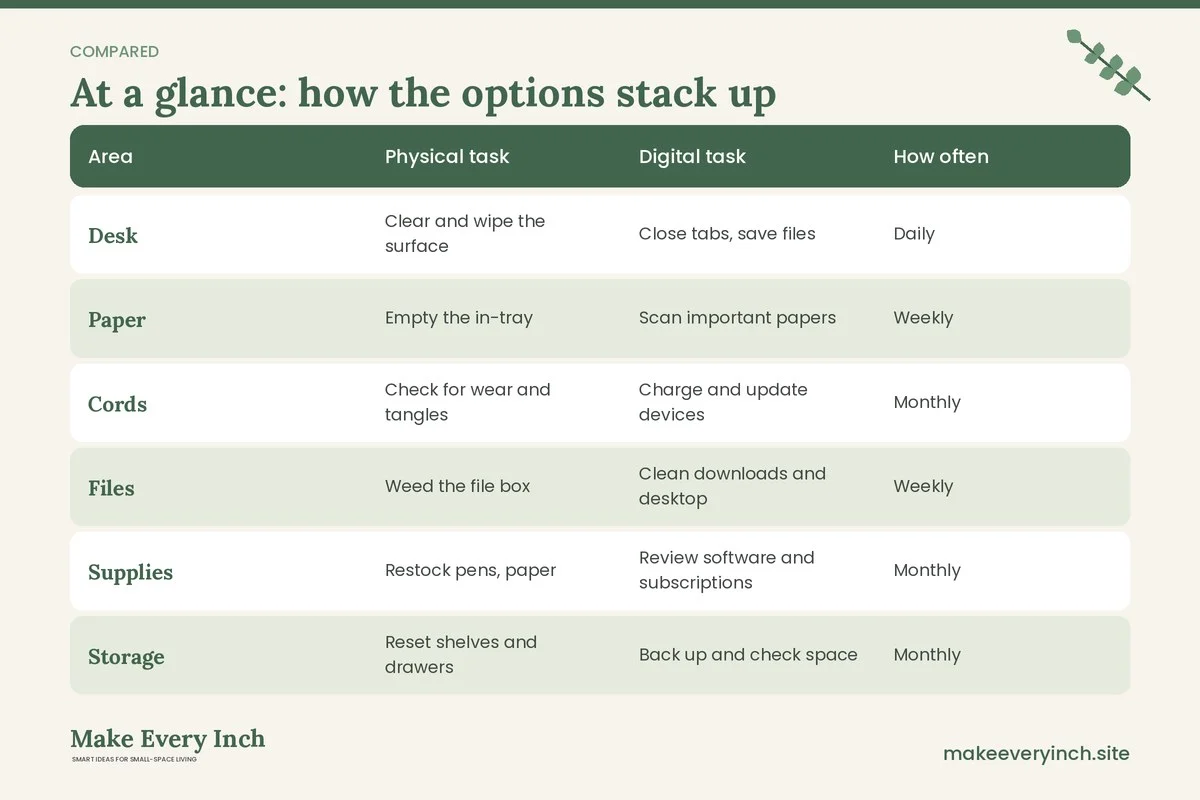
| Area | Physical task | Digital task | How often |
|---|---|---|---|
| Desk | Clear and wipe the surface | Close tabs, save files | Daily |
| Paper | Empty the in-tray | Scan important papers | Weekly |
| Cords | Check for wear and tangles | Charge and update devices | Monthly |
| Files | Weed the file box | Clean downloads and desktop | Weekly |
| Supplies | Restock pens, paper | Review software and subscriptions | Monthly |
| Storage | Reset shelves and drawers | Back up and check space | Monthly |
| Planning | Write tomorrow’s top three | Review the calendar | Daily and weekly |
| Safety | Check power strips and anchors | Update passwords | Monthly |
Printable-style lists you can copy
Copy these onto an index card or a sheet of paper and tape it inside a cabinet door or a drawer front. Tick each box with a pencil, and rub it out at the end of the period, or print a fresh copy.
Daily card
- [ ] Save work and close tabs
- [ ] Write tomorrow’s top three
- [ ] Return tools and pens
- [ ] Clear cups and trash
- [ ] Wipe the desk
- [ ] Park the chair and switch off the lamp
Weekly card
- [ ] Empty the in-tray
- [ ] Clear and dust the desk
- [ ] Empty downloads and desktop
- [ ] Process the inbox
- [ ] Review next week’s calendar
- [ ] Check that the backup ran
- [ ] Water the plant
Monthly card
- [ ] Empty and reset drawers
- [ ] Shred or recycle old paper
- [ ] Check cords and strips
- [ ] Check shelves and anchors
- [ ] Test a backup restore
- [ ] Unsubscribe and cancel what you do not use
- [ ] Re-evaluate the layout
Where things should live: a zone map
A checklist only works when each item has a home. Divide a small office into zones.
- Prime zone: the desk surface and the first drawer. Computer, notebook, pen cup, lamp and the one task in progress.
- Reach zone: within one step. A shelf with the current files, a tray for incoming paper, chargers and a small box of everyday supplies.
- Back-up zone: within the room, but behind a door or in a box. Archive files, spare cables, extra stationery and manuals.
- Elsewhere zone: items that do not belong in the office at all, such as gift wrap or seasonal clothes. Move them out, using ideas from our guide to vertical storage ideas.
Label boxes and shelves with simple tape and a marker. If you share the room, labels tell others where things go and save arguments. Our post on small space organization ideas has more methods that apply across the home.
Three example offices
A desk in the corner of a bedroom
The owner has a 24 by 48 inch desk, a bookcase and a laptop. The daily card sits taped to the inside of a drawer. The weekly card is set as a Friday reminder, and the monthly card is on the first Sunday. The office has a shelf with three baskets: in, out and archive. Because the desk shares a room with a bed, the owner closes the laptop and covers the desk with a cloth at the end of the day to separate work from rest. Our post on small bedroom ideas with a desk shows layouts for this setup.
A closet office in a one-bedroom apartment
A shallow closet holds a desk 20 inches deep. Shelves above hold a printer, a box of files and a lamp. The checklist adds a ventilation task: leave the door open while working and check that chargers have air around them. The monthly review includes checking that nothing is stored against the back of the printer. Because the closet door is closed at night, the owner keeps only a minimal desk surface and puts everything in labeled boxes. Our guide to studio apartment ideas for working from home has more ideas for compact spaces.
A shared dining table office
Two people work from the same table. The checklist is based on a rolling cart that holds each person’s kit. The daily reset takes ten minutes because the table must return to a dining table. Cords are gathered in a box and plugged into a strip that is hidden under the table, with each cord clipped to a leg. The weekly tidy includes checking the cart and clearing the shelf of the sideboard where files live. See our post on how to fit a desk into a studio apartment for similar thinking.
Adapting the checklist to your life
A system must fit the person who uses it. Adjust it in these ways.
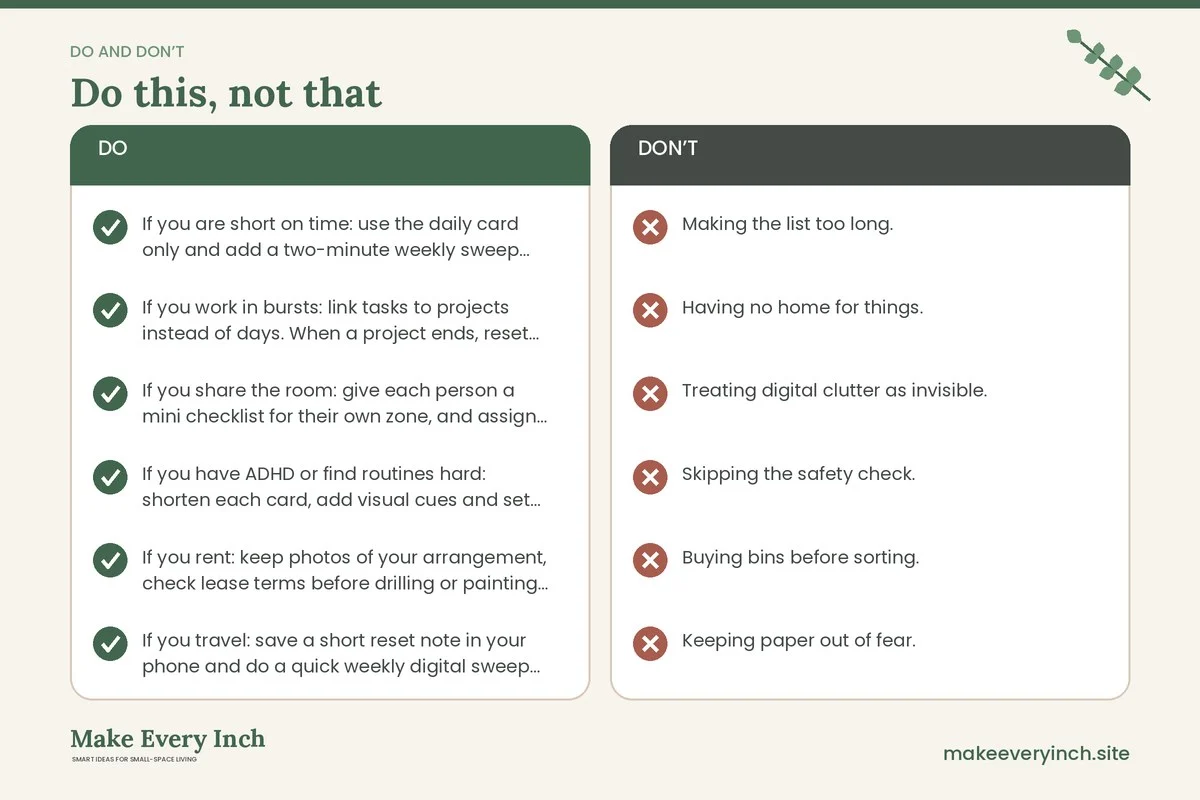
- If you are short on time: use the daily card only and add a two-minute weekly sweep. Skip the monthly deep review for one month, then return to it.
- If you work in bursts: link tasks to projects instead of days. When a project ends, reset its files, boxes and digital folders.
- If you share the room: give each person a mini checklist for their own zone, and assign shared tasks, such as the bin, in rotation.
- If you have ADHD or find routines hard: shorten each card, add visual cues and set alarms. Tick boxes can be satisfying, and a body double or a timer can help. This is general advice and does not replace professional support.
- If you rent: keep photos of your arrangement, check lease terms before drilling or painting and use freestanding storage. Our guide to organization ideas for renters gives more options.
- If you travel: save a short reset note in your phone and do a quick weekly digital sweep from anywhere.
Common mistakes to avoid
- Making the list too long. If it takes an hour to do daily, you will stop. Keep the daily list to five minutes.
- Having no home for things. If an item has no spot, it will land on the desk. Assign homes first.
- Treating digital clutter as invisible. A messy desktop and a full inbox drain focus as much as a messy desk.
- Skipping the safety check. Power strips and cords are easy to forget until something goes wrong.
- Buying bins before sorting. Sort first, then buy the container to fit. Our post on small home organization ideas that actually last explains why.
- Keeping paper out of fear. Check what your local rules ask you to keep, scan what you can and let the rest go.
- Never reviewing. The monthly review lets you tweak the system, and a layout that worked last spring may not fit now.
A one-month rollout plan
If the whole system feels like too much, add it in stages.
- Week one: do the audit and the daily card only.
- Week two: add the weekly physical tasks.
- Week three: add the weekly digital tasks and set a backup check.
- Week four: do your first monthly review, including the safety check.
- After that: keep the three cards and adjust any task that you consistently skip. If you skip it, it is either unnecessary or placed in the wrong period.
FAQ
What should be on a home office organization checklist?
A good list has daily, weekly and monthly tasks that cover the desk, paper, cords, storage and digital files. Add a safety check for power strips, cords and anchored shelves.
How long should the daily reset take?
About five minutes. If it takes longer, shorten the list or fix the reason the desk gets so messy, such as having too many items on it.
How often should I back up my files?
Many people back up weekly at least, and more often for critical work. Test a restore once a month. Choose a method that suits your files and your setup.
How do I keep paper under control in a small office?
Use an in-tray, an archive box and a monthly shred or recycling session. Scan what you can, and check local guidance on how long to keep tax and legal paper. Our guide to small home paper organization ideas goes further.
Is it safe to plug everything into one power strip?
Not always. Keep the total load within the strip’s rating, never daisy-chain strips and plug high-draw appliances into the wall. If you are unsure, ask a qualified electrician.
Can I use this checklist in a rental?
Yes. It uses freestanding storage and no-drill solutions. Ask permission before drilling, painting or fixing anything to the wall.
What if I miss a week?
Restart with the daily card and do a short weekly sweep. A missed week is not a failure, and the system is meant to be forgiving.
Keep going: Keep going with our small home office ideas, the small home office ideas for students post and our guide to small bedroom desk ideas.
Save this guide for later
Pin the ideas you like to Pinterest so you can come back to them when you plan your space.