12 Small Living Room Ideas with a TV That Still Feel Livable
Quick answer: A small living room tv works best when the screen size matches the seating distance, not the wall. As a rough guide, sit about 1.2 to 1.6 times the screen’s diagonal away, keep the center of the screen near seated eye level, put the screen opposite or beside the windows to limit glare, and route every cord out of sight. Anchor any stand or tall unit to the wall, and ask before drilling in a rental.
A small living room tv is a design problem before it is a shopping problem. The screen is the biggest dark rectangle in the room, it needs power and cables, it competes with windows for light and it decides where everyone sits. Get the plan right and the room feels calm even when the screen is on. Get it wrong and the whole space feels like a waiting room pointed at a black panel. This guide is about the decisions around the screen: how large it can be, how far away you should sit, where to put it relative to windows, what to put under it, how to handle cords and sound, and how to make it fade into the room when it is off. It does not repeat the wall styling ideas covered in our small living room TV wall ideas post. For the wider picture of the room, start with our pillar guide to small living room ideas.
Start with distance, not screen size
Most people choose a screen by how big it looks in a shop. Shops are large, so the screen looks small, and it is easy to overbuy. A better method is to start from the one thing you cannot change: how far the seating is from the wall where the screen will go.
Measure from the spot where your head rests on the sofa to the wall or stand where the screen will sit. Write that number down in inches. As a hedged rule of thumb, a comfortable distance is roughly 1.2 to 1.6 times the diagonal of the screen for everyday viewing. Divide your distance by 1.6 to find a larger size and by 1.2 to find a smaller one, and pick a screen between the two. People who like a more cinematic feel lean to the closer end, and people who watch for hours lean to the farther end. Manufacturer guidance and your own eyes should have the final say, and screens with high resolution can be viewed from nearer than older ones.
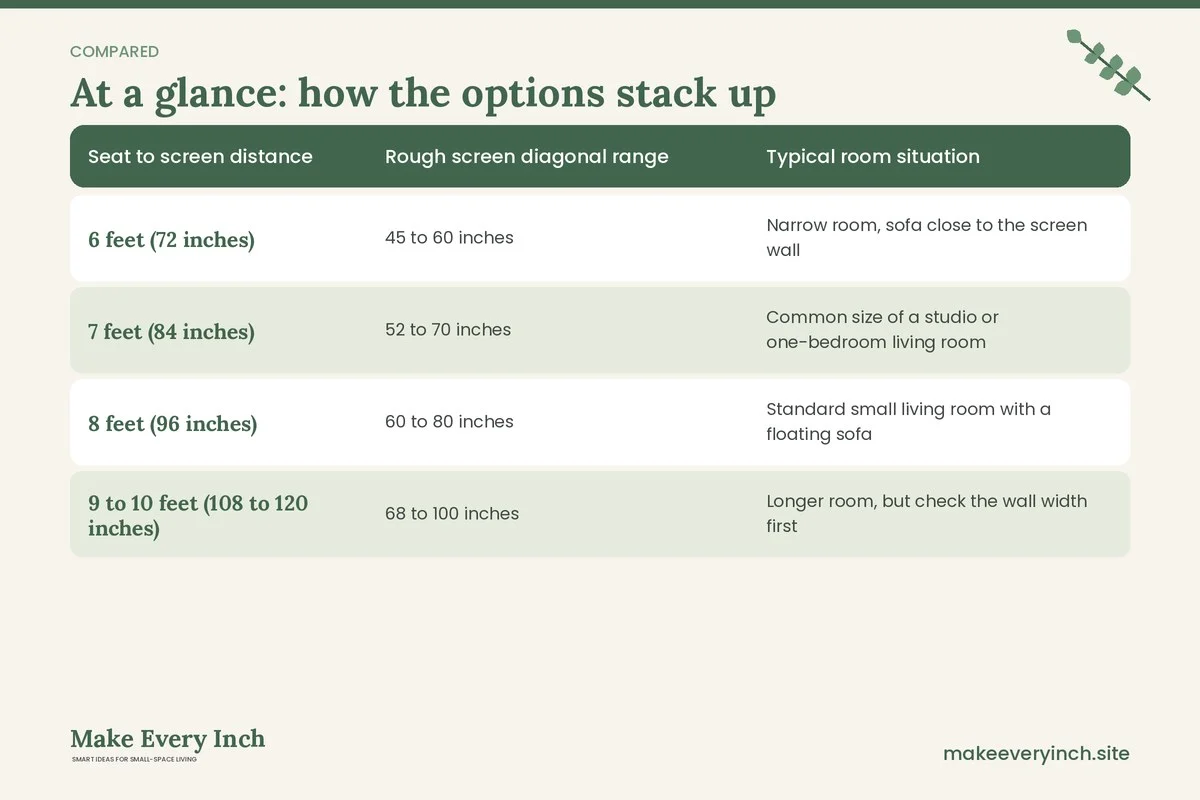
Here is how the arithmetic works in a small room.
| Seat to screen distance | Rough screen diagonal range | Typical room situation |
|---|---|---|
| 6 feet (72 inches) | 45 to 60 inches | Narrow room, sofa close to the screen wall |
| 7 feet (84 inches) | 52 to 70 inches | Common size of a studio or one-bedroom living room |
| 8 feet (96 inches) | 60 to 80 inches | Standard small living room with a floating sofa |
| 9 to 10 feet (108 to 120 inches) | 68 to 100 inches | Longer room, but check the wall width first |
These are starting ranges, not rules. Check them against the wall. A screen that is 55 inches on the diagonal is roughly 48 inches wide, and a 65-inch one is about 57 inches wide. Allow at least a few inches either side for ventilation and for the stand or frame. If the wall is only 60 inches wide between a window and a corner, the screen should be smaller than the maths suggests, or it should move to a different wall.
Where the screen goes: four positions to compare
In a small room the screen can usually sit in one of four places. Each position changes how the furniture is arranged around it.
Position one: the long wall, directly opposite the sofa
This is the classic setup. The sofa faces the screen across the room, and the area between them is the main walkway. It works when the room is at least 10 feet long and the seat-to-screen distance is 7 feet or more. The risk is that the TV becomes the focal point and the sofa becomes a bench facing it. Soften the effect with a rug and a lamp, and keep the wall around the screen visually busy enough, with shelves or art, that the dark rectangle does not dominate when it is off.
Position two: the short wall, with the sofa on the long side
Placing the screen on the short wall lets the sofa run along the long wall and sit at an angle to the screen. People view the screen from a slight angle, which is fine for modest angles, usually up to about 30 degrees off center for most modern panels. This position keeps the walkway along the opposite wall free and is useful in narrow rooms.
Position three: the corner
A corner stand or a swivel mount turns an awkward corner into the media zone. It frees the long walls for storage and art. The cost is that the room’s furniture must angle toward the corner, so check that the sofa still allows a walkway of 30 to 36 inches. Do not place the screen in a corner that blocks a door swing or a radiator.
Position four: a divider wall or console behind the sofa
In a studio or open plan, the screen can sit on the far side of a half wall or on a low unit that doubles as a room divider. This only works when the unit is stable and the cables are managed, but it can separate the sleeping area from the living area. Our guide to how to zone a small open plan home shows how dividers work in practice.
Glare, windows and daylight
Light is the most overlooked part of a small living room tv plan. A screen opposite a bright window shows reflections, and a screen in front of a window shows only a dark outline during the day. Work through these steps.
- Stand where you will sit and look at the wall with the screen position taped out. Note where the window light lands at the time you usually watch.
- Choose a wall that is perpendicular to the window, if you can. A screen on the side wall is lit evenly and rarely reflects the sky.
- If the window must be opposite the screen, add curtains or a roller shade that closes. Light-filtering lined curtains help on a bright afternoon without making the room feel like a cave.
- Place lamps to the side of the screen, not behind the viewer, so that no lamp is reflected in the panel.
- Add a low glow behind or beside the screen, such as a plug-in strip light on a shelf, to reduce the contrast between a bright screen and a dark wall. Keep all electrical items rated for the use, and avoid overloading a single outlet.
For lamp ideas that suit this layout, see our small living room lighting ideas and the roundup of best floor lamps for small rooms.
12 small living room tv ideas
Furniture that carries the screen
1. A low media console, 14 to 16 inches deep
A shallow console holds a router, a streaming box and games, and its top carries the screen if the screen has feet. Choose one whose top is a little wider than the screen base. A console that is 14 to 16 inches deep takes less floor than the typical 18 to 20 inch version. If the console has doors, ventilation holes at the back stop equipment from overheating.
2. A TV stand with a lower shelf for a bar or speaker
Keep the heavy things low. A lower shelf holds a speaker, a plant or baskets with controllers. The aim is to leave the top clear so the screen looks as though it floats. Anchor the stand to the wall with the kit it comes with if the stand is tall or if the screen is heavy. This matters most in homes with children or pets.
3. A narrow bookcase beside the screen
A bookcase 10 to 12 inches deep flanking the screen turns the wall into a unit and balances the dark rectangle with objects and color. Fix the bookcase to a wall stud or use the anti-tip hardware supplied. If you rent, ask permission first, or choose a short bookcase that does not need to be fixed.
Mounting and floating options
4. A wall mount on a stud
A mount removes the stand and frees about 14 inches of floor. It must be fixed into studs or a solid wall rated for the load, and the person installing it must read the weight limit of both the mount and the screen. Never mount on plasterboard alone. In a rental, check the lease and get written permission before drilling. If you cannot drill, skip to idea 7.
5. A swivel arm for a corner
A swivel arm lets one screen serve two seating areas. It is useful in a studio when the living and sleeping zones share a corner. Again, drilling is required, so follow lease rules and the arm’s weight rating.
6. A mount that hides in a cabinet
Closed storage with doors can hide a screen on a bracket. Doors that fold back or slide mean the room reads as a cabinet wall when the screen is off. It is a bigger project, so plan the ventilation and the power outlets before you build.
Options that need no drilling
7. A floor stand with a pole
A freestanding floor stand holds the screen at eye level without touching the wall. The base takes floor area, about 20 by 24 inches for many stands, so measure first. Pick a base that is wide and heavy, and keep it out of the way of children and pets.
8. A TV on a dresser
A long, low dresser at about 28 to 32 inches high with the screen on top and clothing or linens inside is a classic small-space solution. It works well in a combined living and sleeping area. Keep the screen’s feet inside the top surface of the dresser so that nothing overhangs.
9. A rolling cart for a small screen
A small screen on a rolling cart can move between rooms, which suits a studio or a household that does not watch much. The wheels must lock, the cart must be stable, and the cables must be managed so nobody trips.
Making the screen fade into the room
10. Paint the wall behind a dark color
A mid to dark wall behind the screen reduces the contrast between the screen and the wall, so the screen feels like part of the wall. Choose a low-VOC paint, ventilate the room while you paint and during drying, and check the lease first. If you cannot paint, hang a large piece of art or fabric to one side to balance the screen.
11. A picture-frame screen or a cover
Some screens show art when they are off. If you already have a plain screen, a frame-style cover is not necessary; a gallery wall with a few frames nearby achieves a similar effect. Our small living room tv wall ideas go deeper on styling.
12. A rug and a sofa that point at the screen without worshipping it
Turn the seating slightly toward the screen and keep a coffee table or side table in the middle. When the seating is arranged for conversation too, the screen is one feature of the room, not the only one. Read more in our small living room layout ideas.
Cables, power and ventilation
Cords are what make a small living room tv area look messy. A little planning before the screen goes up saves a lot of clutter. Follow these steps.
- Count what plugs in: the screen, a streaming device, a sound bar, a game console, a router. Each needs power and sometimes a data cable.
- Use a single surge-protected power strip with enough sockets, and do not daisy-chain strips. Do not exceed the strip’s rated load, and keep it off carpet and away from curtains.
- Run cables in a cord cover, along the baseboard or behind the stand. Adhesive clips and fabric sleeves are usually fine on rentals, but test a small hidden spot to make sure the adhesive will not mark the paint.
- Leave a few inches of air around the console and the power brick. Equipment vents heat, and cabinets with a closed back can trap it.
- Label both ends of each cable with a tag so you can unplug the right one later.
- Keep cables out of the reach of children and pets. Chewed or pulled cords are a fire and shock risk.
For wall-friendly cord ideas, see our guide to renter-friendly ways to hide cords. If your screen doubles as a work monitor, our post on small home office cable management ideas has extra tips.
Sound in a small room
Small rooms with hard walls and a wooden floor can sound echoey. A few soft items quiet the room without hiding the screen.
- A rug at least 5 by 8 feet under the seating.
- Curtains that reach the floor.
- A bookcase with books, which scatters sound.
- A sofa with fabric rather than a smooth, hard cover.
- Placement of a sound bar or speaker at ear height, not at floor level.
If you have neighbors on the other side of a shared wall, consider placing the speaker away from that wall and keep the bass low at night. Headphones with a long, tidy cord or wireless ones are the easiest courtesy in apartments.
Seating and layout around the screen
Once the screen is in place, arrange the seating so everyone has a good view and a clear path. Follow these measurements.
- Walkway: 30 to 36 inches between the sofa and the screen wall, or between the sofa and the nearest obstacle.
- Eye level: the center of the screen should sit close to the eye height of a seated adult, often 40 to 44 inches from the floor. If you are hanging it, resist the temptation to put it high as if it were art.
- Viewing angle: keep all seats within 30 degrees of the center line of the screen.
- Rug: the front legs of the sofa should rest on the rug, with the rug’s other edge sitting near the base of the screen unit. See our guide to how to choose rug size for a small living room.
- Sofa shape: if the seating is a sectional, see our post on small living room sectional sofa ideas for shapes and orientation.
- Side table: put one by the sofa for remotes and drinks, so the coffee table can be smaller. If you do not want a coffee table, read our guide to small living room ideas without a coffee table.
Three example rooms
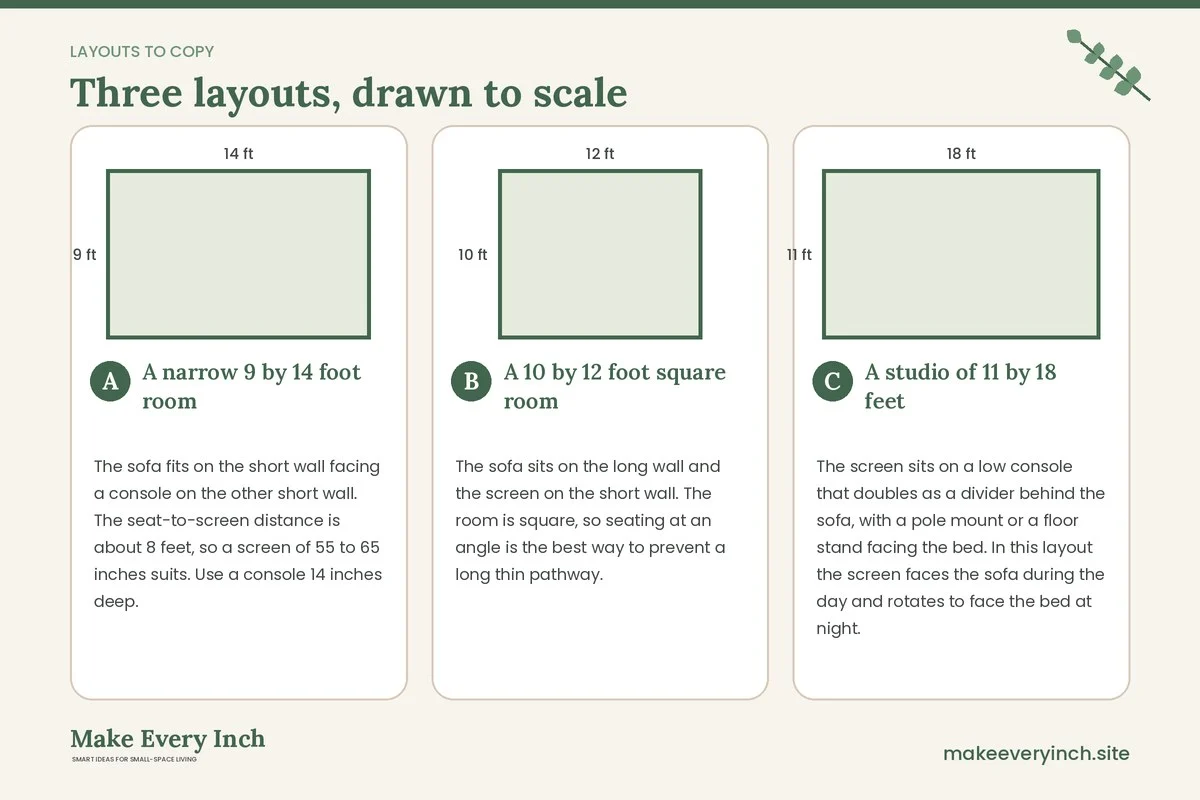
A narrow 9 by 14 foot room
The sofa fits on the short wall facing a console on the other short wall. The seat-to-screen distance is about 8 feet, so a screen of 55 to 65 inches suits. Use a console 14 inches deep. Run the walkway along the window side, keep it 30 inches wide and use a pair of curtains that open fully. A slim floor lamp stands beside the sofa, away from the screen. Total floor taken by the screen unit is about 1.2 square feet beyond the wall.
A 10 by 12 foot square room
The sofa sits on the long wall and the screen on the short wall. The room is square, so seating at an angle is the best way to prevent a long thin pathway. A corner stand holds the screen, and a small armchair opposite finishes a conversation triangle. Distance to the screen is about 7 feet, so choose a screen near 50 to 60 inches. A round rug anchors the middle, and a side table between the sofa and the chair holds a lamp.
A studio of 11 by 18 feet
The screen sits on a low console that doubles as a divider behind the sofa, with a pole mount or a floor stand facing the bed. In this layout the screen faces the sofa during the day and rotates to face the bed at night. The sofa back keeps a path of 30 inches to the kitchen. Because the screen sits on a movable unit, anchor the unit and check that all cables are tied up so nobody trips. Our guide to small apartment living room ideas for studios covers more zoning options.
Mistakes to avoid
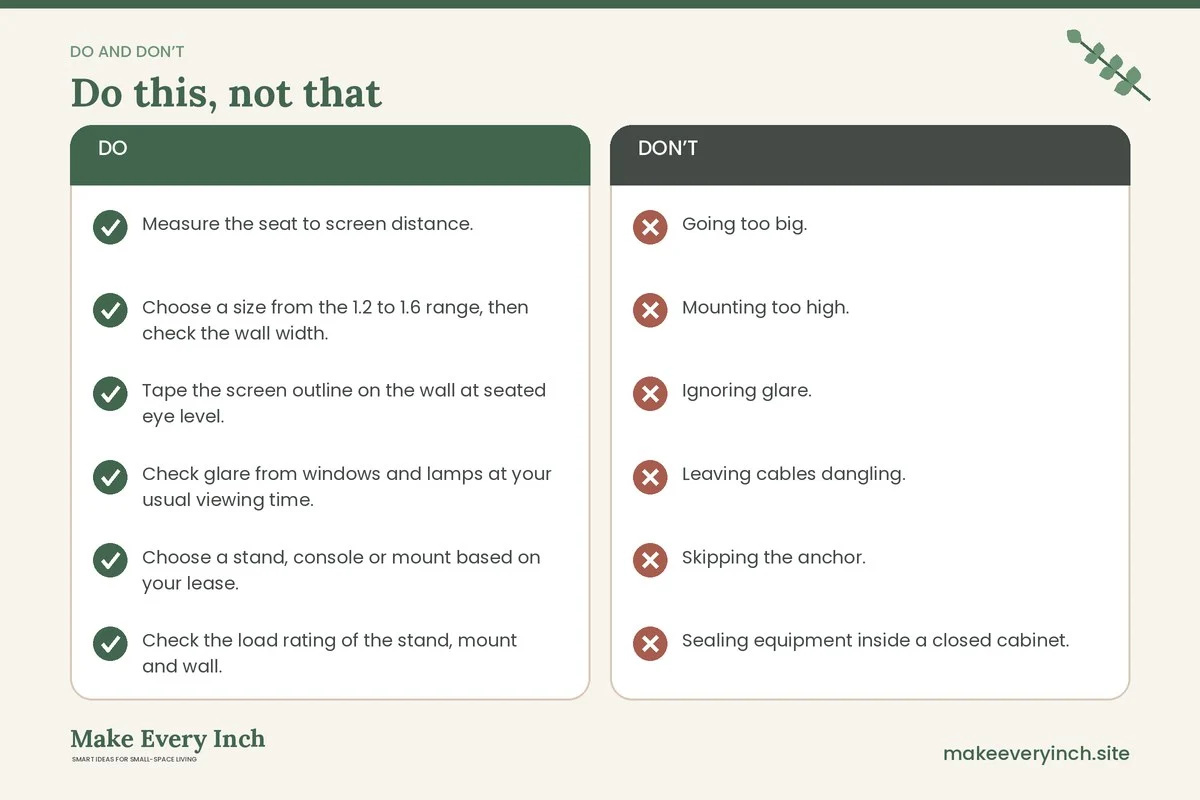
- Going too big. An oversized screen in a small room strains the eyes and takes over. Use the distance formula first.
- Mounting too high. A screen above eye level causes neck strain. Keep the center near seated eye level.
- Ignoring glare. Check the window and lamp reflections before you lock the position.
- Leaving cables dangling. Dangling cords look messy and are a tripping risk.
- Skipping the anchor. Tall stands and bookcases tip. Always use the supplied anti-tip kit or a wall strap, and keep heavy items low.
- Sealing equipment inside a closed cabinet. Heat builds up. Leave ventilation.
- Drilling without asking. In a rental, always get written permission and use the weight ratings of the hardware.
Checklist before you place the screen
- Measure the seat to screen distance.
- Choose a size from the 1.2 to 1.6 range, then check the wall width.
- Tape the screen outline on the wall at seated eye level.
- Check glare from windows and lamps at your usual viewing time.
- Choose a stand, console or mount based on your lease.
- Check the load rating of the stand, mount and wall.
- Anchor any tall unit with the supplied kit.
- Count plugs and buy a single surge-protected strip.
- Plan the cable route and leave air around equipment.
- Keep a 30 to 36 inch walkway.
- Add a rug and a lamp so the room has a second focus.
- Keep cords and small parts away from children and pets.
FAQ
How big should a TV be in a small living room?
Measure the distance from your seat to the wall, then divide by 1.2 to 1.6 to find a comfortable range. For many small rooms the range is 45 to 65 inches. Always check the wall width as well.
How high should I put the TV?
The center of the screen should be close to seated eye level, commonly 40 to 44 inches from the floor. Higher placement strains the neck.
Can I have a TV in a rental without drilling?
Yes. Use a console, a dresser, a floor stand or a rolling cart. Check the weight limits of the furniture and secure tall pieces with straps where the lease allows.
How do I hide the cords?
Use a cord cover, a fabric sleeve or a cable box behind the stand. Keep a single surge-protected strip, label the cables and keep air around the equipment.
Should the TV go over a fireplace?
Only if the mantel does not get hot and the viewing height is comfortable. A high placement often means looking up, so a lower position is usually better.
What if the room is too small for a sofa and a TV?
Choose a smaller sofa, a loveseat or two chairs, and use a compact screen on a wall bracket. See our guide to how to choose a sofa for a small living room.
Keep going: Keep planning with our small living room ideas for renters, small living room storage ideas and small bedroom ideas with a TV.
Save this guide for later
Pin the ideas you like to Pinterest so you can come back to them when you plan your space.