
Small Bedroom Ideas with a TV
Quick answer: The best small bedroom ideas with a TV start with a choice between a wall mount and a low stand, then a sight-line check from the pillow. As a general guide, sit about 5 to 8 feet from a mid-size screen, set the screen center near eye level for how you actually watch (often 36 to 48 inches from the floor for a seated or propped-up view), hide cables in a channel, anchor any stand or tall unit to the wall, and keep the screen off in the last hour before sleep or cover it when it is not in use.
Small bedroom ideas with a TV have a tougher brief than living room versions. The screen competes with a bed, a closet and a nightstand for the same few walls, you watch from a lying or half-sitting position, and the room is also where you try to sleep. A TV that is too big, too high or too bright can make a small bedroom feel crowded or restless. This guide covers whether to mount the screen or put it on a stand, how to think about viewing distance and height, how to manage cables, how to anchor safely, how to protect your sleep, six ways to hide or soften the screen, three example rooms, a comparison table and a checklist. For the wider topic, read our main small bedroom ideas guide, and for the room plan around it see our posts on small bedroom layout ideas and small bedroom storage ideas.
First, ask if the bedroom needs a TV at all
It sounds odd in a guide about TVs, but the first idea worth considering is whether the bedroom is the right place. Many small homes have a living room where the family watches, and the bedroom screen is an extra. A second screen takes up wall or furniture space, adds cables and invites late-night viewing. If the bedroom is the only place you can watch, or if you simply like winding down with a show, a TV is a reasonable choice. The key is to plan it so it serves you and does not run the room.
Ask three questions. How often will you watch, and from where? Will you watch from the bed, from a chair or from the floor? Do you share the room with someone who sleeps at different times? Your answers shape the size, the position and the extras. A person who watches twice a week from a pillow needs a different setup from someone who watches an hour every night with a partner.
If you rarely watch, a small screen on a bracket, a projector, a tablet on a stand or a laptop on a tray might do. These options need less space and are easier to put away, and they are worth weighing before you commit a wall.
Wall mount or stand: the decision in a small room
The choice between a mount and a stand is largely about floor space, the lease and how the room is shaped.
The case for a wall mount
A wall mount frees the dresser top and the floor, and it positions the screen at the height you choose. A swivel arm lets you turn the screen toward the bed or the chair and push it flat when it is off. It also keeps the screen away from children and pets. The drawbacks are the work, the lease and the cables. A mount needs solid fixings, and a screen is heavy and expensive to replace. If you rent, check the lease and ask for permission in writing before drilling, since a mount leaves holes. Walls differ, so follow the instructions for the wall type and the load, and ask a professional if you are unsure.
The case for a stand or dresser
A low stand or a dresser needs no drilling and moves with you. It also gives you a surface for a router, a speaker and a plant, and storage below. The cost is footprint, because even a slim unit takes 14 to 18 inches of floor depth and adds to the room’s visual weight. A dresser doubles as bedroom storage, which makes it a smart choice in a room with no closet. Our guide to the best small dressers shows what to check, and the stand should be rated for the screen’s weight and size.
The in-between options
A few choices sit between the two. A floor stand with a pole holds the screen without drilling, and some include a base that tucks under a bed. A bracket that clamps to a shelf or a frame holds a small screen. A screen on a rolling cart travels to the living room and back. A tabletop stand that attaches to the screen lets you set it on a dresser. Each of these has a weight limit and a stability rating, so check them against the screen’s specifications.
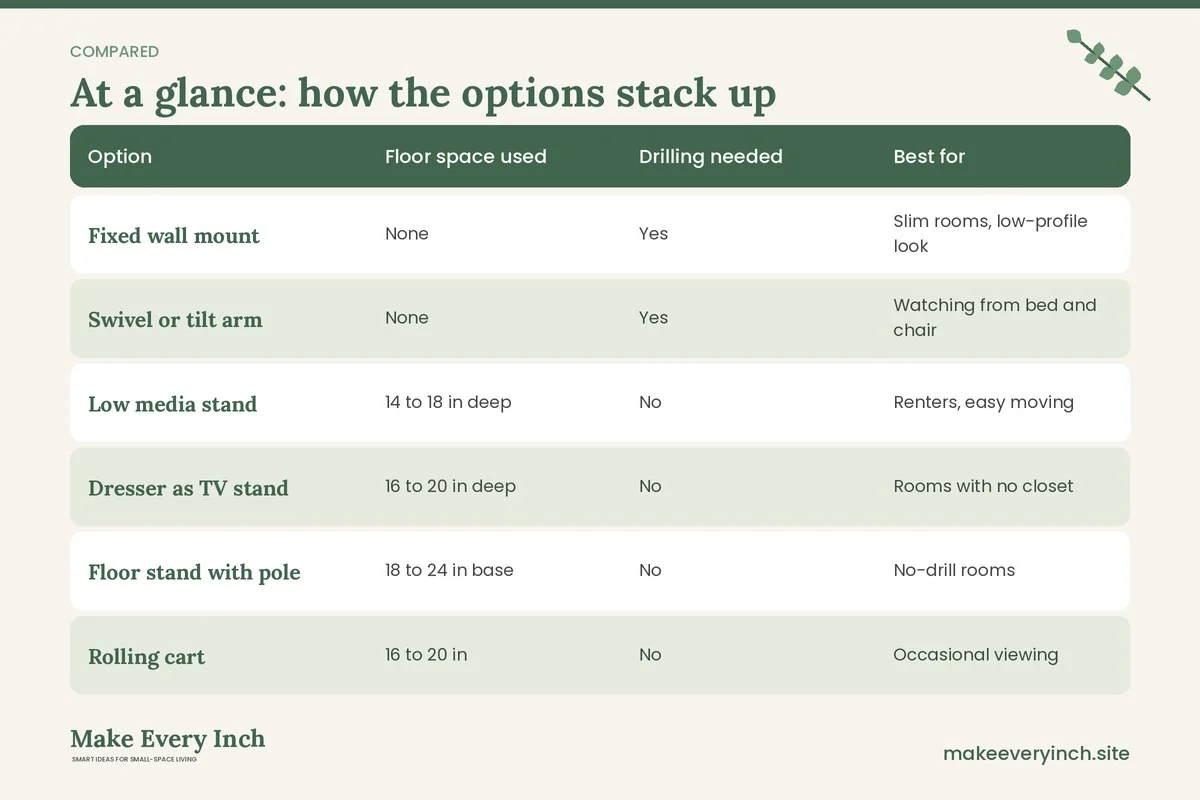
Mount or stand comparison table
| Option | Floor space used | Drilling needed | Best for | Watch out for |
|---|---|---|---|---|
| Fixed wall mount | None | Yes | Slim rooms, low-profile look | Fixed angle, holes in walls |
| Swivel or tilt arm | None | Yes | Watching from bed and chair | Arm weight, extended reach |
| Low media stand | 14 to 18 in deep | No | Renters, easy moving | Tip risk, floor space |
| Dresser as TV stand | 16 to 20 in deep | No | Rooms with no closet | Weight rating, drawer clearance |
| Floor stand with pole | 18 to 24 in base | No | No-drill rooms | Stability, base footprint |
| Rolling cart | 16 to 20 in | No | Occasional viewing | Locking wheels, cables |
| Ceiling or bracket mount | None | Yes | Awkward rooms | Reach, installation difficulty |
Whichever you choose, read the manufacturer’s guidance for weight and wall type, and do not guess.
Viewing distance and height
Viewing advice varies, and comfort depends on your eyes, the screen and the content. These ranges are hedged guides for a small bedroom, and they are a starting point for a test, not a rule.
- Distance from the bed: many people find a seating distance of about 5 to 8 feet comfortable for a screen of 32 to 43 inches, and a bit farther for larger screens. A common rough guide is to multiply the screen’s diagonal by 1.2 to 1.6 to get a distance range. A 32 inch screen suits about 3.5 to 4.5 feet, and a 43 inch screen about 4.5 to 6 feet. Bedrooms are small, so the screen size is often limited by distance and not by the wall.
- Screen height: aim for the center of the screen to sit near eye level for your usual position. If you watch propped up against pillows, the eye level may be 36 to 44 inches from the floor, and from a sofa or chair it is closer to 40 to 44. If you watch lying down, the screen can sit higher or can tilt, but a screen mounted high above the bed may strain the neck.
- Angle: tilt a screen down slightly if it sits above eye level. Many mounts allow 5 to 15 degrees of tilt, though the amount depends on the model.
- Off-axis viewing: if the bed is wide, people on the sides sit at an angle. Some screens lose color when seen from the side, so a swivel arm helps.
- Brightness and glare: a screen opposite a window gets reflections. Place the screen at a right angle to the window, or use curtains.
- Eye comfort: a small amount of ambient light behind the screen reduces contrast between the screen and the dark wall.
To test a layout, tape a piece of cardboard cut to the screen’s size on the wall or the stand. Lie or sit in your usual spot and look at it for a few minutes. Adjust the height and the size before drilling or buying.
Sizing the screen for the room
Bigger is not better in a small room. A screen that fills the wall dominates the space and draws the eye away from the calm you want in a bedroom. Work out a size using distance, then consider the wall.
Measure the distance from the pillow or the chair to the wall where the screen will go. Divide it by 1.2 to 1.6 for a diagonal range in the same unit, and then convert to inches. For instance, 6 feet is 72 inches, which gives a screen of roughly 45 to 60 inches by the formula, though a small room often feels better with a screen toward the lower end. For a 9 by 10 foot room with the bed on the short wall, a 24 to 32 inch screen is often plenty. For a 12 by 12 foot room, a 32 to 43 inch screen can sit comfortably.
Also measure the wall space. Leave at least 8 to 12 inches of clear wall on each side so the screen does not feel jammed. Remember the screen’s depth with the stand, the cable and the plug, since power connectors can add several inches behind the unit.
Cable management
A TV has a power cord, an HDMI or streaming connection and often a game console or sound bar. In a small bedroom, those cables are an eyesore and a hazard. Handle them early.
- Plan the route before mounting. Decide where the power outlet is and how the cables will reach it. A short run is neater and safer.
- Use a cable channel. A paintable raceway on the wall covers cables from the screen to the outlet. Check that adhesive products are safe for your paint, and test first in a hidden spot.
- Do not run power cords inside walls unless the installer is qualified. In-wall cable systems may need certified products and an electrician. Never cut or extend a mains cord yourself to run it through a wall.
- Keep cables off the floor. A cord across the floor can be tripped on and can pull the screen down. Clip cables along the back of the stand.
- Use one surge-protected power strip. Choose one with a recognized safety mark, never daisy-chain strips, and keep it off the bed and away from bedding. Make sure the strip has air around it.
- Label the ends. A small tag on each cable saves guessing later.
- Reduce the number of devices. A streaming stick that plugs into the back of the screen replaces a box, a cable and a remote. A wall-mounted soundbar needs another cable.
- Wireless options. Wireless headphones keep a partner asleep and take away speaker cables.
- Leave slack. A tight cable can strain the port or pull the screen when moved on a swivel arm.
If the outlet is far from the screen, ask an electrician about adding one. An extension cord is a temporary fix and should not run under a rug.
Anchoring and safety
Tipping is one of the most common home hazards for screens and tall furniture. A bedroom is where people sleep, and a falling screen or dresser can be dangerous.
- Anchor any stand, dresser or tall unit to the wall. Use anti-tip straps or brackets rated for the load and the wall type. Follow the instructions. If you cannot drill, ask your landlord for permission or choose a lower, wider piece that is less likely to tip.
- Pick a stand that matches the screen. The stand should be wider than the screen’s feet, and the weight rating should exceed the screen’s weight.
- Check mount ratings. A mount should be rated for the screen’s weight and size and its hole pattern. Use the supplied hardware and follow the instructions. If you are unsure of the wall, consider a professional installer.
- Find the studs or use proper anchors. Plasterboard alone cannot hold a heavy screen. Use studs or anchors rated for the load, and do not use adhesive hooks.
- Never drill without permission. In a rental, holes can cost you your deposit. Get approval in writing.
- Check for hidden wires and pipes. Use a detector before drilling.
- Keep the screen away from the bed’s head. A screen mounted above the headboard could hit someone if it fails. Place it on the opposite wall when possible.
- Mind children and pets. Keep cords out of reach and anchor everything.
- Ventilate the back. Screens and consoles warm up. Do not enclose them in a cabinet without airflow, and keep curtains and bedding away from vents.
- Check the lease and local codes. Rules differ by place.
Protecting your sleep
A TV in the bedroom can make it easy to stay up late. Sleep specialists often suggest keeping screens away from bedtime, and many people find that bright light and exciting content make it harder to wind down. These ideas are general and not medical advice. If sleep is a problem, consider speaking to a health professional.
- Set a cut-off time. Try turning the screen off 30 to 60 minutes before you want to sleep. Replace it with a book, a podcast or quiet music.
- Use the sleep timer. Most screens have an automatic off feature. It prevents the screen from running all night.
- Lower the brightness. A dimmer screen and a night mode reduce the glare in a dark room.
- Use warm bedside lighting. A soft lamp in the evening helps the room feel restful. Our small bedroom lighting ideas show layered options.
- Choose content carefully. A calm show suits bedtime better than a loud action film.
- Cover standby lights. A small piece of opaque tape or a cover over a bright indicator light helps darkness. Do not cover vents.
- Charge devices away from the bed. Phones in the room invite scrolling.
- Keep the TV off the bed’s sight line. If the screen sits opposite the pillow, a cover or a closing cabinet makes the bed feel like a bed.
- Discuss habits with your partner. Headphones and a timer prevent disputes in a shared room. Our post on small bedroom ideas for couples covers sharing the space.
Six ways to hide the screen
A black rectangle on a bedroom wall is not always the look you want. These ideas hide or soften it.
1. A cabinet with doors
A cabinet, an armoire or a media unit with doors closes the screen away. Keep the doors open while watching, and ensure airflow. Check that the unit is anchored and rated for the weight, and leave vent space at the back. Doors that fold flat to the sides are better than doors that swing into the room.
2. A sliding panel or curtain
A fabric panel on a ceiling track or a rod covers the screen when it is off. Use a heavy curtain, a woven screen or a framed panel. Keep fabric away from heat vents and keep a gap behind it.
3. A mirror-style or art screen
Some screens show art when off. If you do not have one, a framed piece on a hinged board can swing over the screen. It must be light and secure, and it should not rest on the screen’s surface.
4. A recessed niche or built-in
If the room has a deep alcove or a closet, set the screen inside and add doors or a curtain. A shallow niche works on a swivel arm. This option needs permission and measuring, and a built-in needs ventilation.
5. A dark wall
A deep wall color makes a dark screen disappear. Paint the wall behind the screen a dark shade, and the screen looks like part of the wall. Use a low-VOC paint, ventilate the room well and wait until the smell clears before sleeping there. In a rental, check the lease and the repaint rules first.
6. A gallery wall around it
Surround the screen with frames and shelves so it looks like one piece of a collage. This works when the screen is small or the wall is wide. Use adhesive strips only for light frames and follow the weight limits. See our guide to renter friendly wall decor ideas.
Choosing the position: where the screen can go
Opposite the bed
This is the classic spot. The screen sits on the wall facing the foot of the bed, on a mount or a low dresser. The viewing angle is direct, but the screen is in your sight line when you lie down, so a cover helps. In a 10 by 12 foot room, the distance from the headboard to the wall is often 7 to 9 feet, which suits a 32 to 43 inch screen.
In a corner
A corner mount or a stand angled across the corner saves a wall and leaves the long walls free for the bed and storage. The viewing angle is diagonal, so a swivel arm is useful. It suits a narrow room where the bed fills the center.
Beside the bed
A screen on a swivel arm beside the bed can swing over the pillow. It is useful in tiny rooms but needs a sturdy arm and tidy cables. Do not place a heavy screen directly above the pillow.
On the dresser
A small screen on a dresser keeps the TV and storage together. The dresser must be sturdy and anchored. Keep the screen toward the back of the top, so it does not hang off the edge.
Above the headboard
Avoid this unless you have a strong reason. It makes the neck strain and the screen could fall on the sleeper. If this is the only wall, choose a small screen, a solid mount and a professional install.
Three example rooms
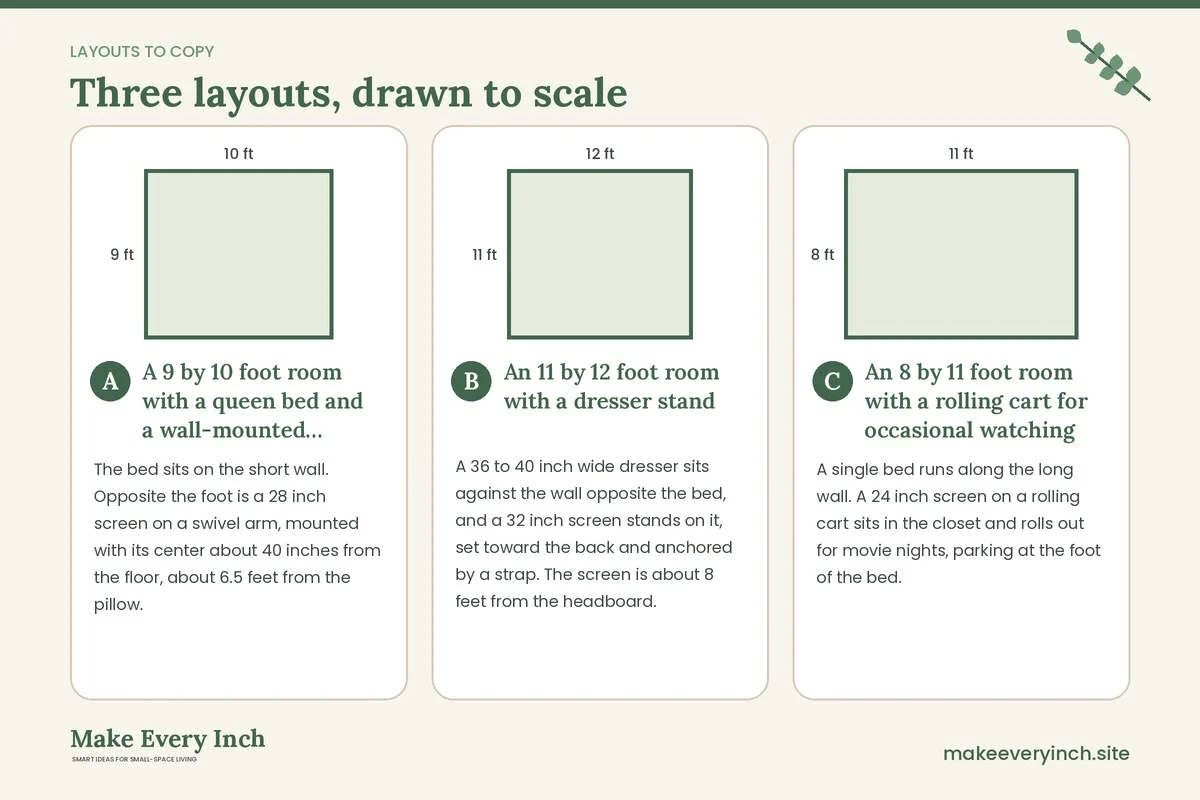
A 9 by 10 foot room with a queen bed and a wall-mounted screen
The bed sits on the short wall. Opposite the foot is a 28 inch screen on a swivel arm, mounted with its center about 40 inches from the floor, about 6.5 feet from the pillow. A cable channel runs down to a power strip on the floor behind a nightstand. A heavy curtain on a rod can slide across the screen at night. The dresser sits beside the closet. The plan keeps a 30 inch walkway and uses no floor space for the screen. Check the lease before drilling. For more on this bed size, see our guide to small bedroom ideas with a queen bed.
An 11 by 12 foot room with a dresser stand
A 36 to 40 inch wide dresser sits against the wall opposite the bed, and a 32 inch screen stands on it, set toward the back and anchored by a strap. The screen is about 8 feet from the headboard. Cables run behind the dresser into a cable cover and one power strip with a switch. A cabinet-style door is not needed, since a throw over the screen at night softens it. The top drawers hold chargers and the bottom ones hold clothes, which links to our post on small bedroom furniture ideas.
An 8 by 11 foot room with a rolling cart for occasional watching
A single bed runs along the long wall. A 24 inch screen on a rolling cart sits in the closet and rolls out for movie nights, parking at the foot of the bed. The cart has locking wheels, and a power strip is mounted at a safe height inside the closet. When the screen is away, the room looks like a bedroom and nothing glows at night. This plan suits renters, students and people who watch occasionally. See also our small bedroom ideas for renters.
Sound, comfort and the neighbors
Small rooms bounce sound and thin walls carry it. A few changes help.
- Use headphones or a pillow speaker. They keep a partner or a neighbor undisturbed.
- Add soft surfaces. A rug, curtains and a fabric headboard absorb echo and reduce the volume you need.
- Check the wall. If the screen is on a shared wall, a heavy bookshelf or a curtain on the other side may help, though results vary.
- Mind the vibration. A soundbar on a hollow dresser can rattle. Place a mat under it.
- Plan comfort. A pillow wedge or a bolster supports your back while you watch. A lap tray helps if you eat in bed, though a table is cleaner.
Common mistakes
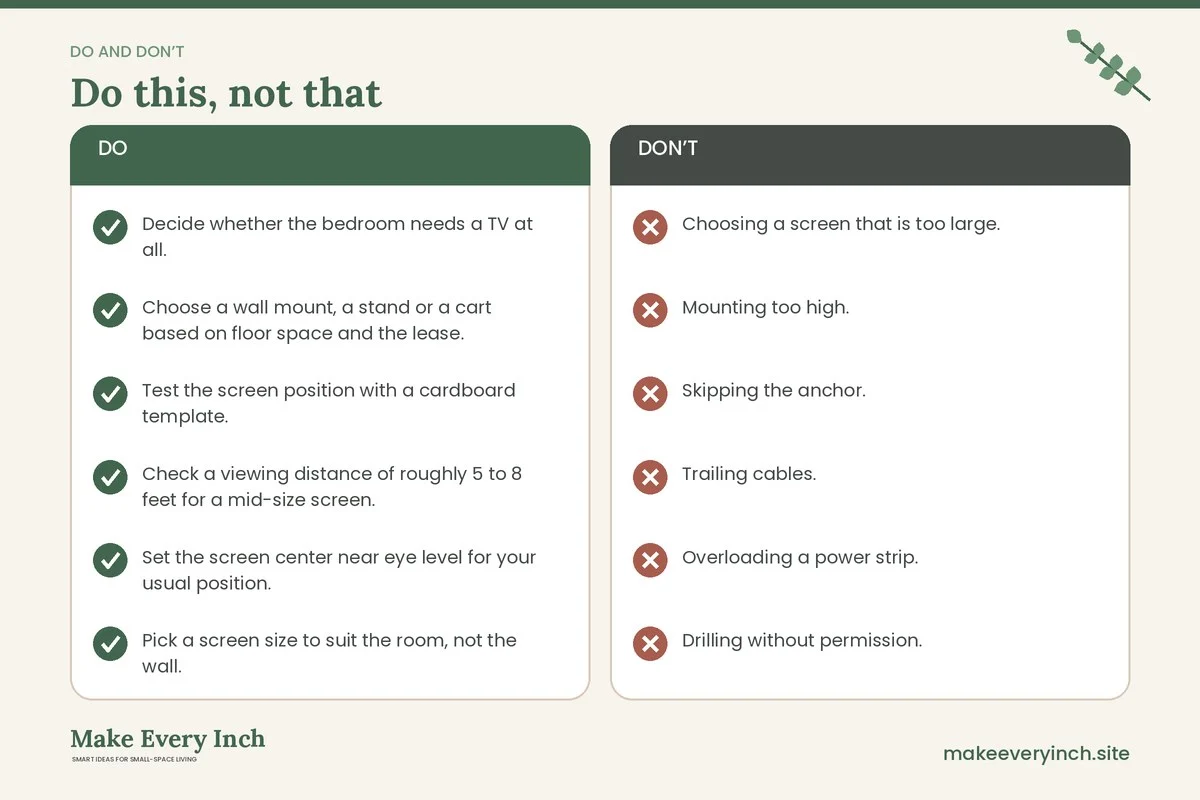
- Choosing a screen that is too large. It overwhelms the room and strains the eyes at close range.
- Mounting too high. A screen above eye level causes neck strain, especially when watched for hours.
- Skipping the anchor. A dresser or a stand can tip, so strap it.
- Trailing cables. They look messy and cause trips.
- Overloading a power strip. Keep to the rated load and avoid daisy-chaining.
- Drilling without permission. Holes in a rental can cost you.
- Placing the screen opposite a window. Glare ruins the picture.
- Letting the TV take over the bed zone. A bedroom works best when rest comes first.
- Blocking vents. Screens and consoles need airflow.
Bedroom TV checklist
- Decide whether the bedroom needs a TV at all.
- Choose a wall mount, a stand or a cart based on floor space and the lease.
- Test the screen position with a cardboard template.
- Check a viewing distance of roughly 5 to 8 feet for a mid-size screen.
- Set the screen center near eye level for your usual position.
- Pick a screen size to suit the room, not the wall.
- Anchor stands, dressers and tall units to the wall.
- Confirm mount ratings and wall fixings, and use a stud finder.
- Get permission before drilling in a rental.
- Route cables in a channel and use one surge-protected strip.
- Keep vents and strips clear of bedding.
- Set a sleep timer and a screen cut-off time.
- Choose a way to hide the screen when it is off.
- Cover bright standby lights, but not vents.
- Use headphones if you share the room.
FAQ
Is it okay to have a TV in a small bedroom?
Yes, if it suits the way you live. Choose a modest size, keep the room’s layout calm and protect your sleep with a cut-off time. If rest is a problem, you might try removing the screen for a few weeks.
How big a TV should I put in a small bedroom?
Many small bedrooms suit screens of about 24 to 43 inches, depending on the distance from the bed. Measure the distance first, and test the size with a cardboard template.
How high should I mount a bedroom TV?
A common aim is to put the center of the screen near eye level for your usual position, which is often 36 to 48 inches from the floor. If you watch lying down, a slightly higher position with a tilt may feel better. Test it first.
How do I hide a TV in a bedroom?
Use a cabinet with doors, a curtain on a track, a hinged art panel, a dark wall color or a gallery wall around the screen. Leave airflow behind the screen and keep fabric away from vents.
How do I hide the wires?
Use a paintable cable channel on the wall, clips behind the stand and a single power strip. Never run mains cords inside walls unless a qualified person does it.
Can I mount a TV in a rental?
Only with the landlord’s permission. If drilling is not allowed, use a low stand, a dresser, a floor stand or a cart. Our guide to no-drill storage ideas for renters offers other ways to work around the rules.
Keep going: Keep planning with our small bedroom ideas with a desk, small bedroom organization ideas and small bedroom ideas for families.
Save this guide for later
Pin the ideas you like to Pinterest so you can come back to them when you plan your space.